bitbucket.org PRs
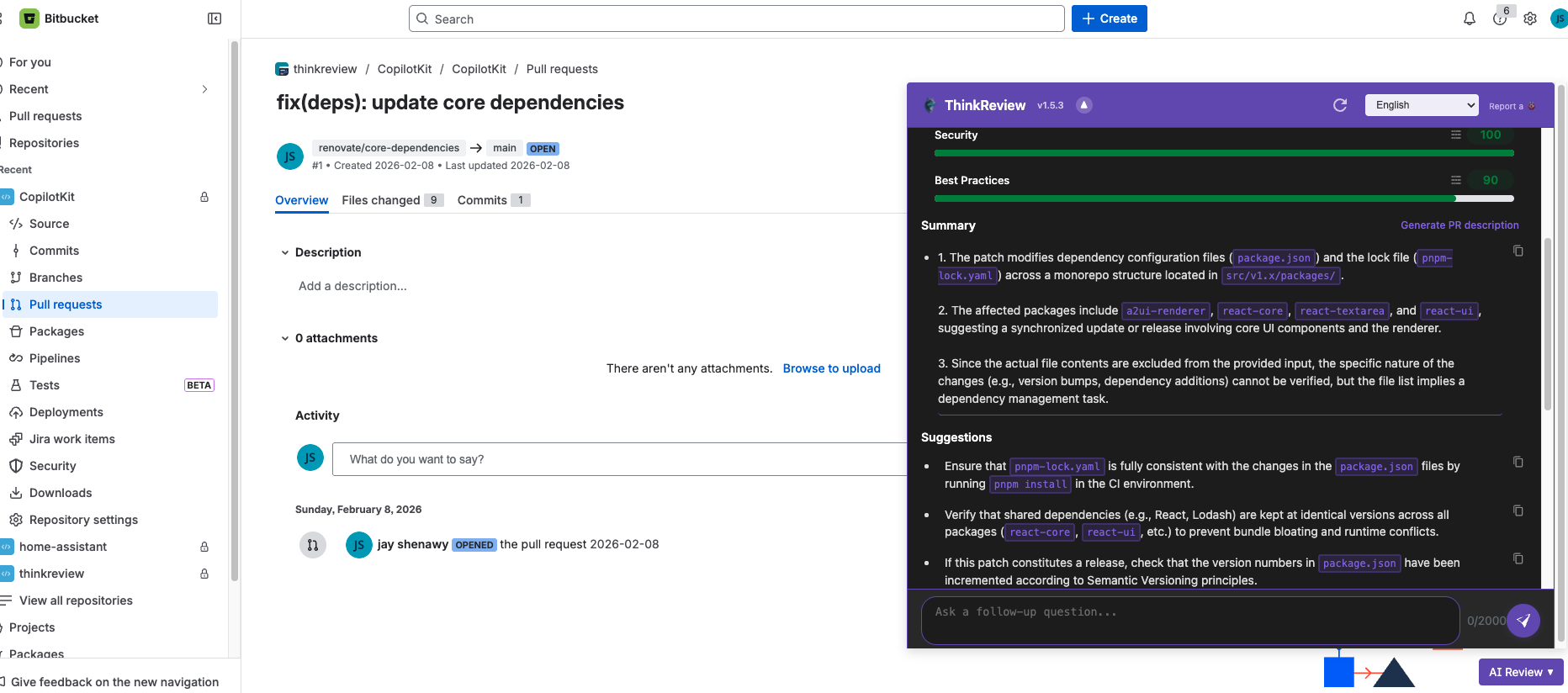
Open a pull request on Bitbucket Cloud and run ThinkReview from the sidebar.
ThinkReview reviews Bitbucket Cloud pull requests in the browser—quality scores, security notes, and suggestions without a new CI job.
Chrome · Firefox · Edge · Brave
Built to fit your existing git workflow—no new platform to adopt.
Open a pull request on Bitbucket Cloud and run ThinkReview from the sidebar.
Connect with a Bitbucket API token—full steps in the Cloud integration guide.
Ask about the diff, get summaries, and turn findings into review comments.
Self-hosted Bitbucket? See the Bitbucket Data Center lander and docs.
Get from install to first review in a few minutes.
Add the browser extension.
Configure Bitbucket Cloud credentials in the portal or extension settings.
Open a PR on bitbucket.org and start the analysis.
Explore more features, platforms, and documentation.
Connect Bitbucket Cloud and open your next pull request.