NCSC Critical PHP Security Alert (PHP2Shell): What It Is and How to Fix It
The UK NCSC and PHP Foundation warned of two CVSS 9.2 critical PHP vulnerabilities (CVE-2026-109618 and CVE-2026-109619). Here is how to patch and mitigate them.

Two CVSS 9.2 remote code execution flaws in PHP prompted the UK NCSC to warn organizations to patch immediately—or be ready to take unpatched internet-facing systems offline.
On October 21, 2026, the UK's National Cyber Security Centre (NCSC) published an emergency alert, Critical security issue affecting PHP, warning organizations to prepare for immediate patching across every system running PHP. Where immediate remediation is not feasible, the NCSC advised organizations to consider taking internet-facing PHP systems offline until the vulnerabilities are mitigated.
The alert followed an advance notice on October 20 from the PHP security team and PHP Foundation scheduling an emergency security release for Wednesday, October 21, 2026 at 14:00 UTC (15:00 BST) to fix two critical vulnerabilities, both scored CVSS v4.0 9.2. Ahead of the embargo, the CVE identifiers—CVE-2026-109618 and CVE-2026-109619—and demonstrations of an exploit chain dubbed PHP2Shell leaked online, prompting advisories from CERT-EU (2026-018) and confirmation from watchTowr that the vulnerabilities are real.
What we know about CVE-2026-109618 and CVE-2026-109619
Both vulnerabilities carry an official CVSS v4.0 9.2 (Critical) rating from the PHP security team and are tracked publicly as remote code execution (RCE) flaws affecting PHP 5.4 through PHP 8.5. Because the bugs sit in the PHP runtime itself rather than a single CMS plugin, they affect web servers running WordPress, Laravel, Symfony, Drupal, Magento, WooCommerce, and custom PHP backends alike.
Public research and proof-of-concept reconstructions point to request and session handling that runs before your application PHP code even starts:
- Multipart uploads and
session.upload_progress: Enabled by default since PHP 5.4, PHP's upload progress handler inspectsmultipart/form-dataPOST requests containing aPHP_SESSION_UPLOAD_PROGRESSfield before executing the target script—even on endpoints that never callsession_start(). Researchers documented paths combining unvalidated upload-progress session data,session.use_only_cookiesbypasses, and local file inclusion (LFI) gadgets, as well as memory corruption inphp_session_rfc1867_callback. - Use-after-free and PHP-FPM serializer state: Independent analysis also identified a use-after-free condition triggered via destructor re-entry (
var_destroy) and serializer state persisting across PHP-FPM worker requests. - Early exploitation attempts: On the morning of October 21, Cloudflare CTO Dane Knecht confirmed that Cloudflare was already seeing early attack traffic emerging in the wild and had deployed emergency WAF rules as a stopgap.
The hardest operational problem is version sprawl. Shodan data analyzed by Mallory on October 20 found that out of roughly 1.5 million internet-facing hosts disclosing a PHP version, 883,717 hosts (about 59%) run PHP 8.1 or older—branches that have reached End-of-Life and receive no official fixes from the PHP project.
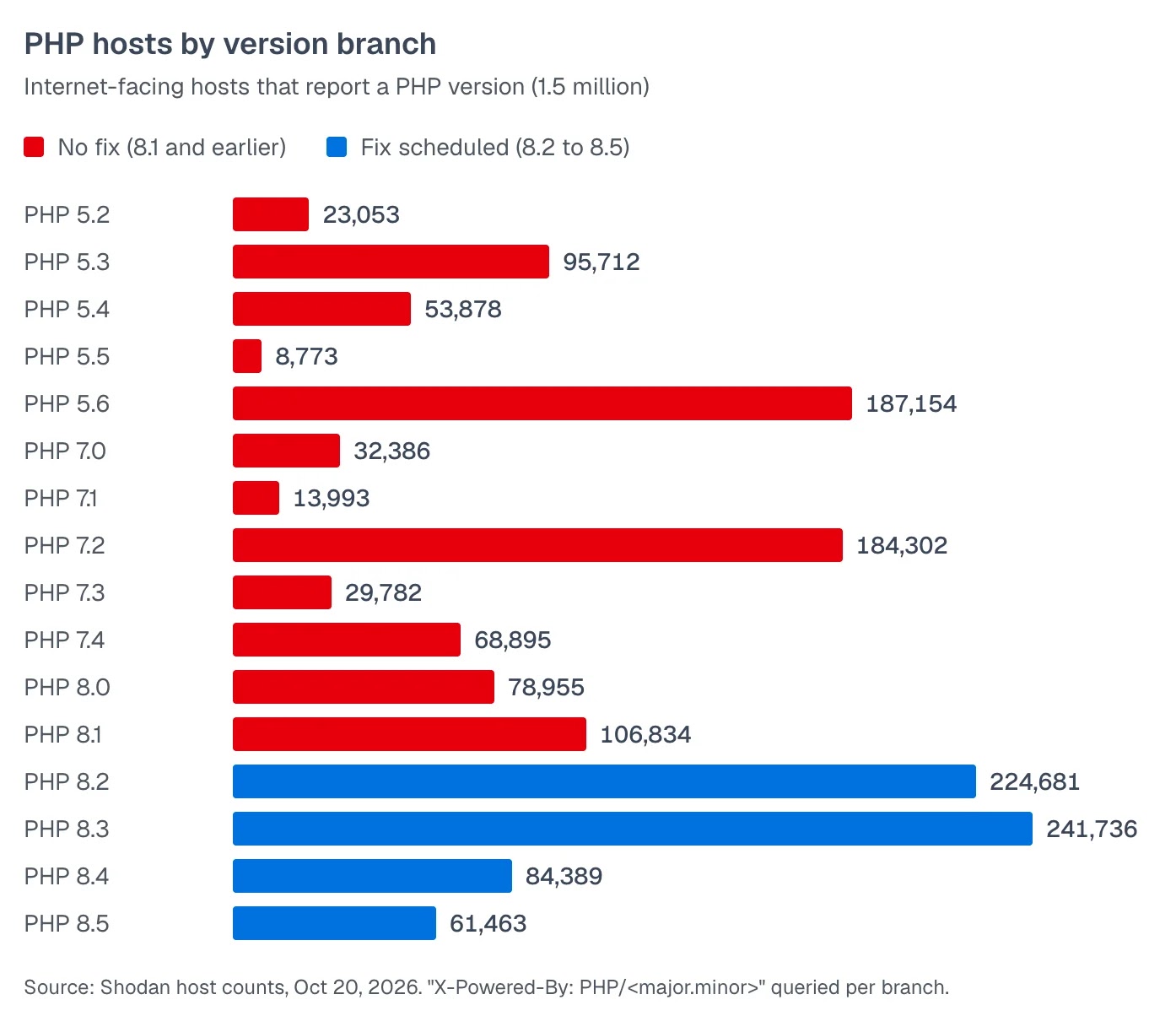
Source: Mallory Shodan host counts via Cyber Security News, October 20, 2026.
Which PHP versions receive the official patch
The PHP project only ships official security releases for branches in active or security support. If you build from source, use official Docker images, or track upstream releases, target these patched versions:
| PHP Branch | Support Status | Patched Release | Support Cutoff |
|---|---|---|---|
| PHP 8.5.x | Active support | 8.5.12 | Dec 31, 2029 |
| PHP 8.4.x | Active support | 8.4.27 | Dec 31, 2028 |
| PHP 8.3.x | Security fixes only | 8.3.36 | Dec 31, 2027 |
| PHP 8.2.x | Security fixes only | 8.2.35 | Dec 31, 2026 |
| PHP 8.1 and older | End-of-Life (EOL) | No upstream php.net fix | Expired |
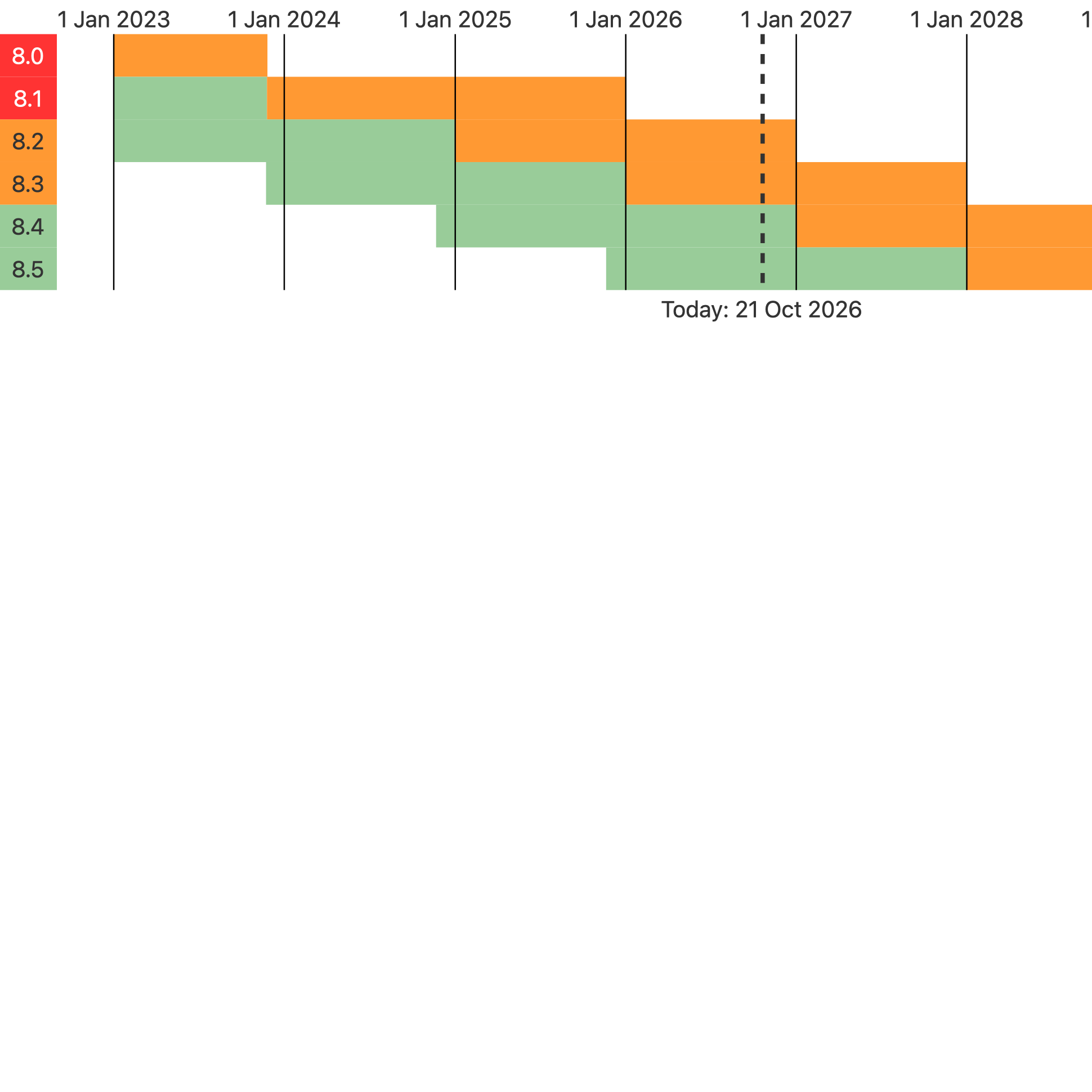
Source: PHP Supported Versions, PHP.net, October 21, 2026.
Two infrastructure caveats matter if you are on Linux packages:
- Distro backports keep old version strings: Debian, Ubuntu, and Red Hat Enterprise Linux backport security patches into their existing PHP packages without bumping the upstream minor version. Do not rely on
php -valone to check if a distro package is patched. - Remi's RPM repository delay: The PHP Foundation noted that
rpms.remirepo.net(widely used on RHEL, AlmaLinux, and Rocky Linux) would not publish same-day updates on October 21. Teams depending on Remi packages should plan for vendor packages, official containers, or source builds if immediate remediation is required.
How to fix it: step-by-step remediation
PHP core developer Gina Peter Banyard and PHP 8.6 release manager Joe Ferguson both emphasized a single baseline rule: upgrading/patching PHP is the only complete mitigation—php.ini tweaks alone will not close every vector.
Follow the NCSC's five-point action plan in this order:
1. Inventory every PHP runtime (not just php -v)
The CLI binary reported by php -v often differs from the PHP-FPM pool or Apache libphp module handling live HTTP traffic, and embedded appliances frequently bundle hidden PHP binaries.
# Find PHP and PHP-FPM binaries across the host
find /usr /opt /srv -xdev -type f \( -name 'php' -o -name 'php-fpm*' -o -name 'php-cgi*' \) -perm -u+x 2>/dev/null \
  | while read -r bin; do printf "%s -> %s\n" "$bin" "$("$bin" -v 2>/dev/null | head -n 1)"; done

# Inspect local Docker images for bundled PHP versions
docker images -q | sort -u | xargs -r docker image inspect --format '{{.RepoTags}} {{.Config.Env}}' | grep PHP_VERSION
2. Apply the PHP security update and restart workers
Update your system packages or rebuild your container images against the patched 8.2.35, 8.3.36, 8.4.27, or 8.5.12 tags. Updating the package on disk does not replace running worker processes until you restart php-fpm or Apache:
# Debian / Ubuntu example for PHP 8.4 FPM
sudo apt-get update && sudo apt-get install --only-upgrade 'php8.4*'
sudo systemctl restart php8.4-fpm
3. Verify the CVE in your package changelog
On Debian, Ubuntu, and RHEL-based systems using backported fixes, confirm that CVE-2026-109618 and CVE-2026-109619 appear in the installed package changelog:
# Debian / Ubuntu
apt changelog php8.3-fpm | grep -E "CVE-2026-109618|CVE-2026-109619"

# RHEL / Rocky / AlmaLinux
rpm -q --changelog php-fpm | grep -E "CVE-2026-109618|CVE-2026-109619"
Interim mitigations while you test or migrate off EOL PHP
If you are migrating an older PHP 7.x or 8.1 application and cannot deploy the upgraded runtime immediately, combine these defense-in-depth controls—or take the NCSC's advice and isolate the service from public networks until the upgrade is ready.
1. Harden php.ini and PHP-FPM pool settings
Because PHP parses upload headers before your script starts, calling ini_set() inside application code does nothing. Disable session.upload_progress and enforce strict cookie-only sessions in your php.ini and FPM pool configuration (for example /etc/php/8.3/fpm/pool.d/www.conf):
php_admin_flag[session.upload_progress.enabled] = off
php_admin_flag[session.use_strict_mode] = on
php_admin_flag[session.use_only_cookies] = on
php_admin_flag[expose_php] = off
Reload php-fpm after saving and verify with phpinfo() over an actual web request, then delete the test file immediately.
2. Restrict multipart/form-data on routes that do not accept uploads
If an application does not need public file uploads—or only accepts uploads on specific admin routes—reject multipart/form-data requests at Nginx or Apache before they reach PHP-FPM:
# Nginx: reject multipart/form-data on non-upload endpoints
map $http_content_type $is_multipart {
    default 0;
    "~*^\s*multipart/form-data" 1;
}
map $uri $allow_upload {
    default 0;
    "~^/wp-admin/(async-upload|media-new)\.php

                    quot; 1;
}
set $block_multipart "$is_multipart$allow_upload";
if ($block_multipart = "10") {
    return 415;
}
3. Enable Cloudflare WAF or ModSecurity rules
- Cloudflare WAF: Cloudflare deployed emergency WAF rules covering known exploit vectors for all plans, including the free tier. Ensure your DNS records are Proxied and lock your origin firewall so HTTP/HTTPS traffic is accepted only from Cloudflare IP ranges.
- ModSecurity: Reject requests carrying the
PHP_SESSION_UPLOAD_PROGRESSpost parameter:
SecRule ARGS_POST_NAMES "@streq PHP_SESSION_UPLOAD_PROGRESS" \
    "id:1026109618,phase:2,deny,status:403,log,t:none,msg:'Block PHP_SESSION_UPLOAD_PROGRESS (CVE-2026-109618/109619)'"
Auditing emergency PHP upgrades and LFI chains with ThinkReview
Emergency runtime upgrades from PHP 7.4 or 8.1 to PHP 8.3/8.4 often force rapid pull requests across Dockerfiles, CI pipelines, session handlers, and legacy application code. At the same time, several PHP2Shell exploit chains rely on application-level local file inclusion (LFI) or unsafe deserialization gadgets to turn session-file injection into full code execution.
ThinkReview Cloud combines full repository context with live Search Grounding so security reviews know current CVEs and runtime advisories.
When your team opens pull requests to bump PHP base images, harden Nginx/FPM configs, or patch legacy endpoints, ThinkReview gives you a second set of eyes directly on the diff:
- Search Grounding on the PR: ThinkReview Cloud checks live advisories and supported version cutoffs so a Dockerfile bumping from
php:8.1-fpmto an unpatched tag gets flagged before merge. - Security & Pentest Review Agents: Run dedicated security agents on your merge requests to catch dynamic
include/requirepaths (LFI gadgets), unvalidatedunserialize()calls, and exposed debug routes. - Review from the browser or your IDE: Use the ThinkReview browser extension on GitHub, GitLab (including self-hosted CE and EE), Azure DevOps, and Bitbucket, or call
review_url_codevia ThinkReview MCP directly from Cursor or Claude Code.
Patch your PHP runtimes first, verify the CVE changelog on every worker host, and review the migration pull requests before they hit production.
References: UK NCSC alert Critical security issue affecting PHP (October 21, 2026), PHP 2026 News Archive, CERT-EU Security Advisory 2026-018, Tenable PHP2Shell FAQ, and Sansec PHP2Shell research. Review your upgrade PRs with ThinkReview.
Newsletter
Want the next one?
Leave your email and I’ll send the post when it’s published. Models, agents, and the review work in between. No drip after that.
One email when we publish. Unsubscribe in a click.