










ThinkReview Cloud v2.2.1 — coming on August 29, 2026. Release notes

Used by engineering teams at

On the record

What people say after they use it

Reviews from the Chrome Web Store, Product Hunt, and G2, quoted as written. Cards link back to the listing.

G2

Fast, Actionable Code Review Feedback That Catches Bugs Early

4.5/5

I like how ThinkReview delivers fast, contextual, and actionable feedback on code changes. It helps me catch potential bugs, edge cases, and maintainability issues early, while also reducing the manual effort involved in code reviews. The feedback is practical and easy to understand, which makes it a valuable addition to my development workflow.

Lugman T. Tech Specialist · Enterprise (1,000+ employees)
Chrome Web Store

As someone less technical and much more focused on product design, having thinkreview in my toolkit is a must. Firstly, it helps keep discipline and the codebase clean. Secondly, it catches issues that could easily be missed. It gives me an extra layer of confidence before things move further into production. For me, it’s simply one of those tools you should have in every development workflow.

Karol Debski Product design
Product Hunt Bright idea

Love that the reviewer stays in control of what actually gets posted to the PR, it's a thoughtful answer to the usual AI review tool fatigue.

Buğlem
Chrome Web Store

One of the best AI tools focused on code quality that I've tested recently. It works really well in the development ecosystem, saves precious time, and the integration is super simple. I'm still learning its features in a clean and simple interface.

Rosamaria Nascimento
Chrome Web Store

Really useful AI code review tool. It helps me catch potential issues and improve code quality before merging. The feedback is clear and easy to understand.

Đạt Phan
Chrome Web Store

very handy to be able to chat wit the PR , I like the agents and the full context for the whole repo not just the diff.I use it for azure and bitbucket

How it works

From the sidebar to the whole repository

Scroll through what ThinkReview does: the sidebar, your editor, your rules, your agents, and every platform you run.

01 / 06

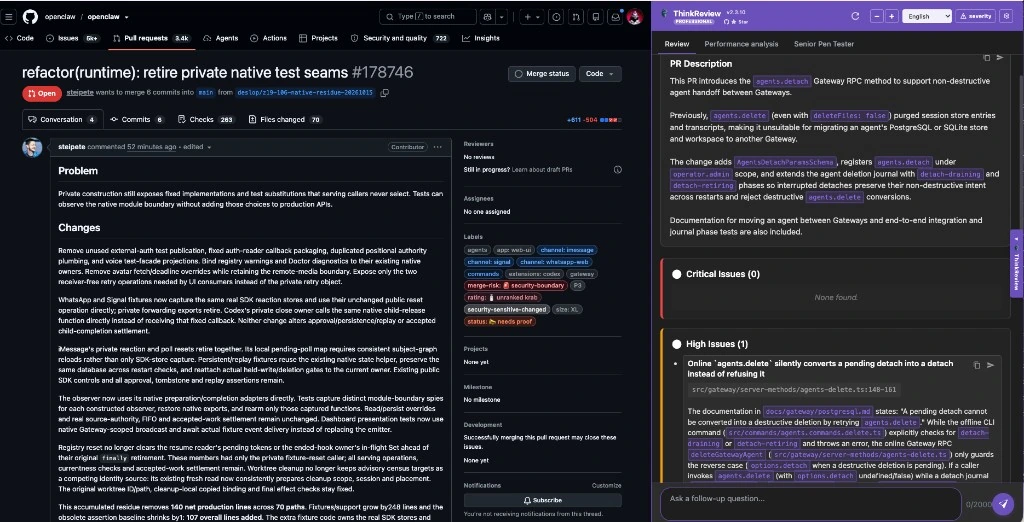
Lives in the sidebar.

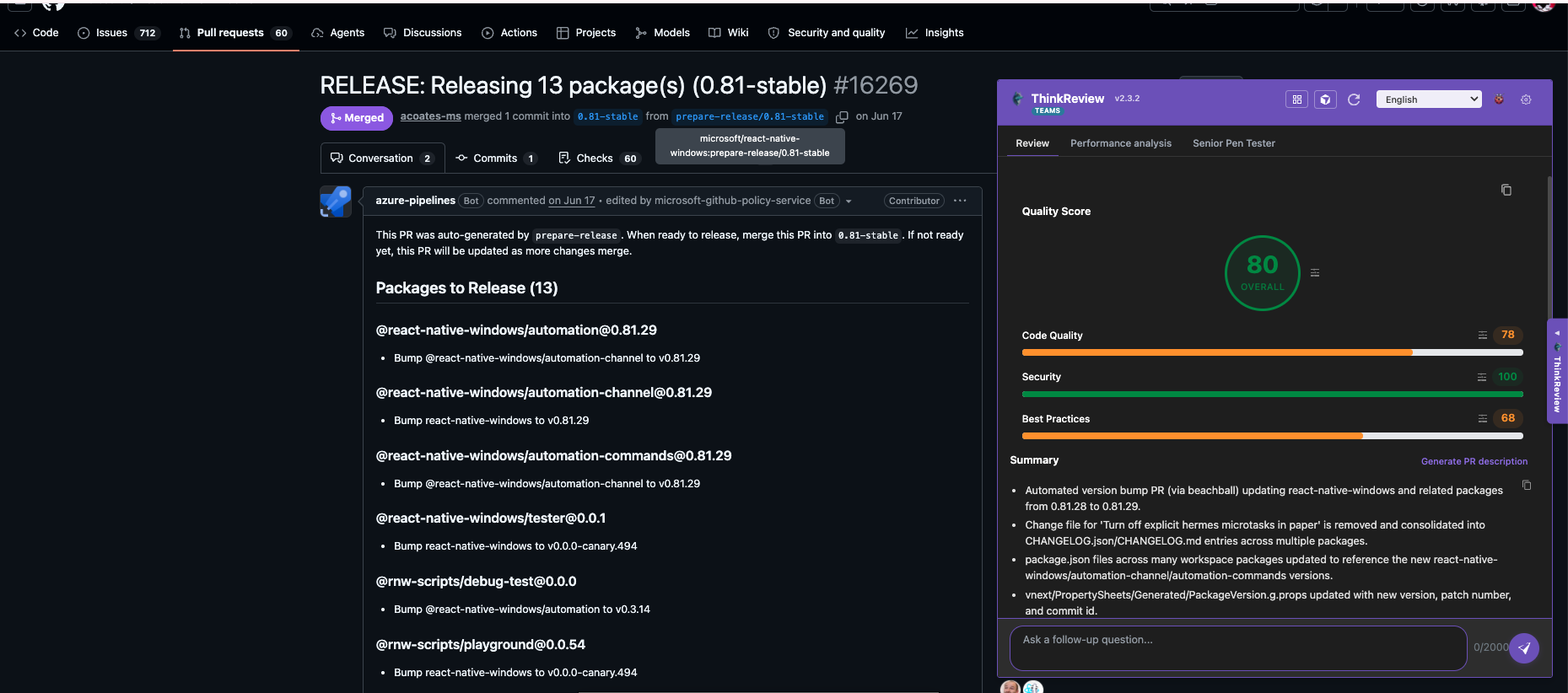
ThinkReview opens beside the diff on the pull request page, so the review sits next to the code it talks about. No extra tab and no checkout of another branch.

A dark-theme GitHub pull request with the ThinkReview panel docked on the right, showing the PR description and a high-severity issue
02 / 06

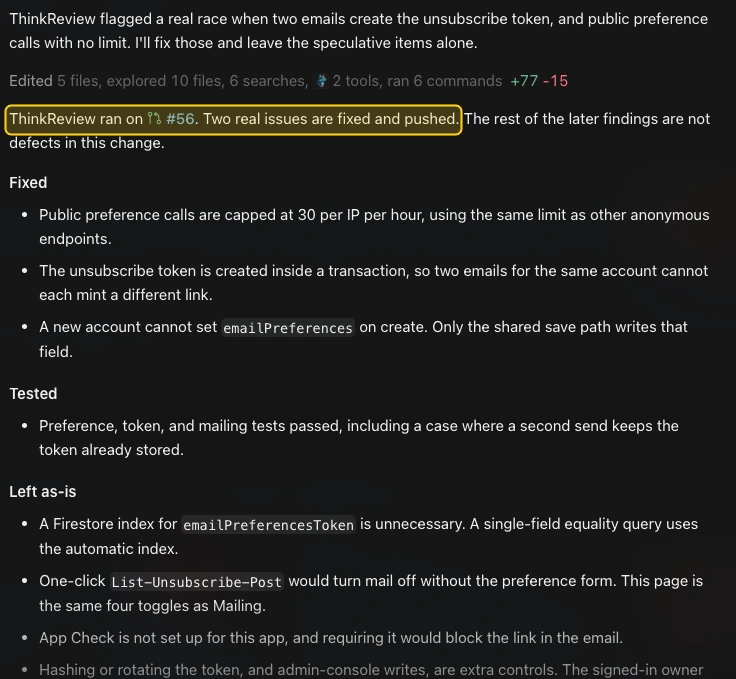
Reviews from inside your editor.

Paste a pull request URL into Cursor, Claude Code, or Copilot. ThinkReview MCP fetches the changes and hands your assistant a structured review, using the same credits as the extension.

  • Cursor
  • Claude Code
  • Claude Desktop
  • VS Code Copilot
Get the setup config
Cursor
Cursor reporting that ThinkReview ran on pull request 56 and that two real issues are fixed and pushed, followed by the list of fixes
03 / 06

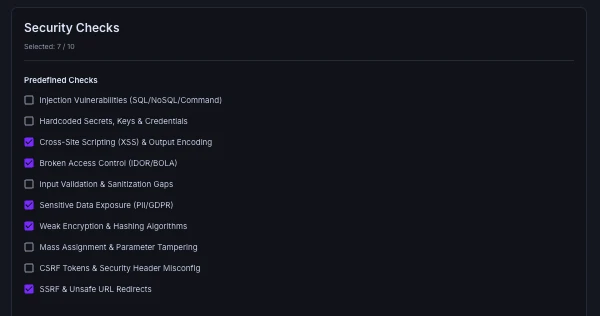
Your standards, on every review.

Pick the security and best-practice checks your team cares about once, in the portal. They apply to every review, from the sidebar and from MCP, in both review layouts.

Custom rules
portal.thinkreview.dev/custom-rules
The Custom Rules page in the ThinkReview portal with security checks selected, such as cross-site scripting and sensitive data exposure
  • Extension sidebar
  • MCP reviews
  • Scoring layout
  • Severity layout
04 / 06

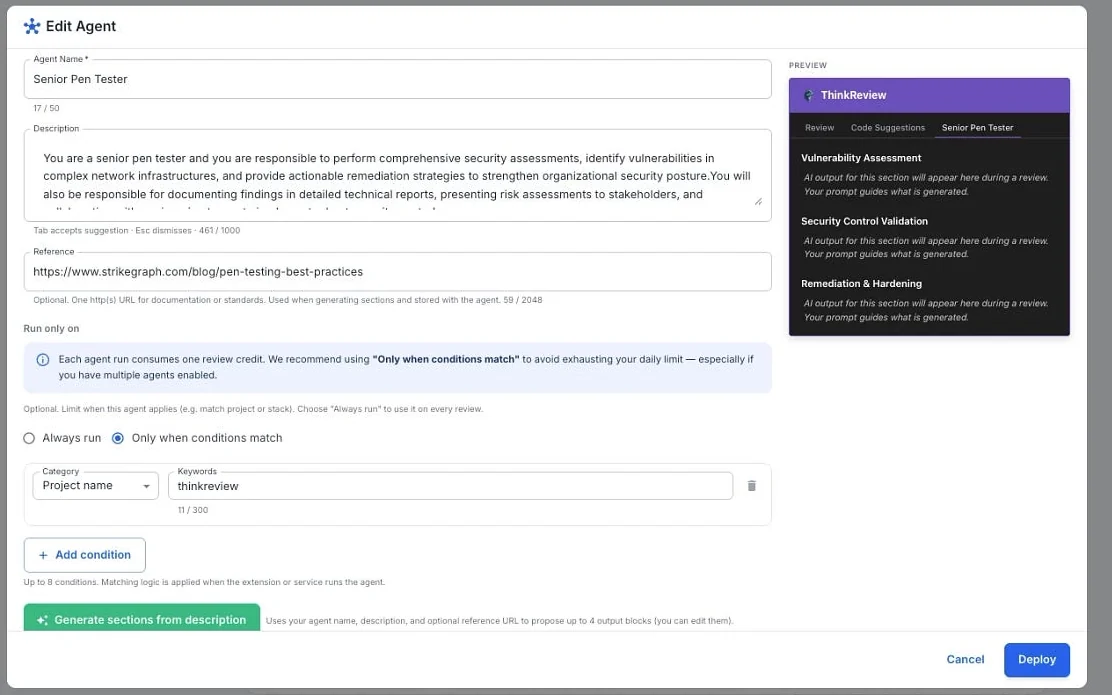
Set up an agent in the portal.

Name it, describe what it checks, add a reference, and choose when it runs: always, or only when the project or stack matches. Generate its output sections, then deploy.

Review agents
The Edit Agent dialog in the ThinkReview portal with a name, description, reference URL, run conditions and a preview of the agent's output sections
05 / 06

Agents run beside the review.

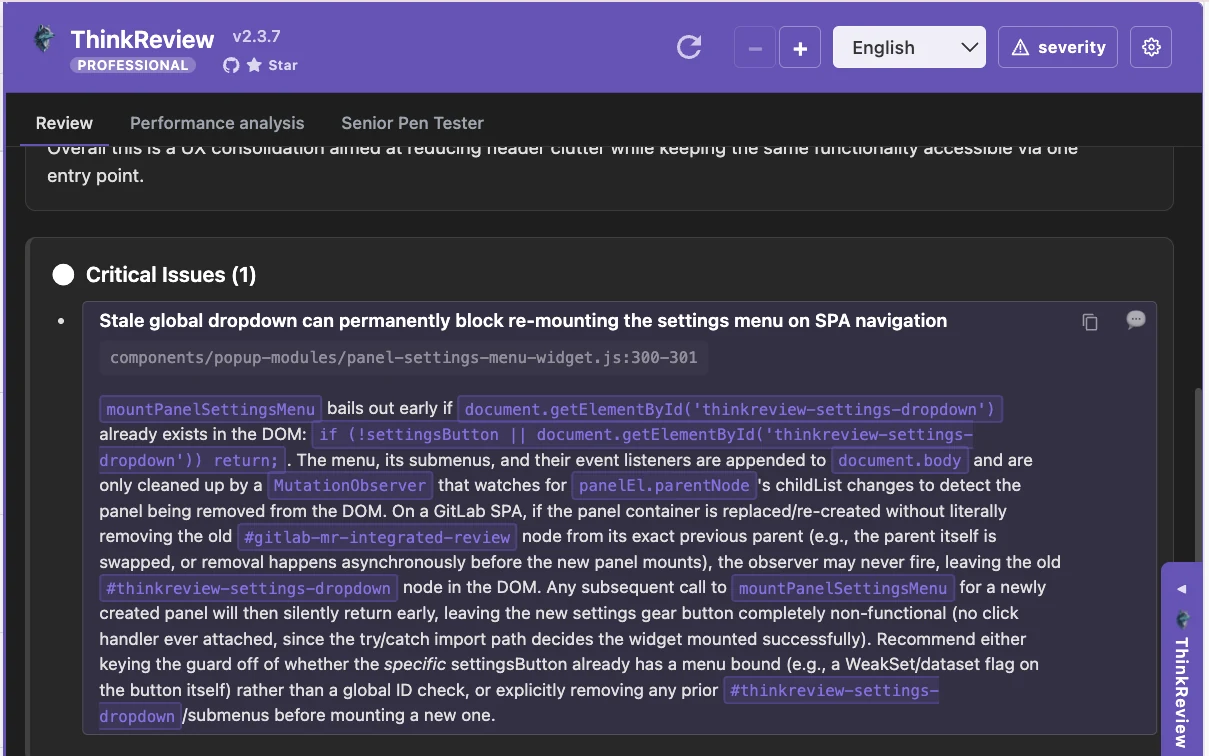
Every agent gets its own tab in the sidebar, next to the main review. Security, performance, or your own conventions, each with findings you can act on. An agent run uses one review credit.

The ThinkReview panel with Review, Performance analysis and Senior Pen Tester tabs, and a critical issue listed
06 / 06

Cloud or on-prem, same sidebar.

GitHub, GitLab, Azure DevOps, and Bitbucket, including GitHub Enterprise Server, self-managed GitLab, Azure DevOps Server, and Bitbucket Data Center.

GitHub
  • Cloudgithub.com
  • On-premGitHub Enterprise Server
GitLab
  • CloudGitLab.com
  • On-premSelf-managed GitLab
Azure DevOps
  • CloudAzure DevOps Services
  • On-premAzure DevOps Server
Bitbucket
  • CloudBitbucket Cloud
  • On-premBitbucket Data Center

Why a sidebar

A copilot for the reviewer. Not a bot in the repository.

Review bots post their opinion into the pull request for everyone. ThinkReview gives it to one person: the engineer who is accountable for the approval.

Review botsCodeRabbit, Copilot and similar
Everyone sees all of it

The bot talks to the whole pull request

  • Summary, walkthrough, diagrams and inline comments land in the thread, useful or not.
  • The author answers or dismisses each one in public.
  • Some tools can approve on their own, with no engineer reading first.
ThinkReviewVisible to one person: you
One click, one comment

The reviewer reads first and posts only what matters

  • Findings stay in a private panel beside the diff until you post.
  • One click posts the ones you choose, under your name.
  • ThinkReview cannot approve, merge or block. The human stays in the loop.

Human in the loopNo clutter in the pull request.

Left: an illustration of a typical AI review bot, such as CodeRabbit or Copilot, filling a pull request. Right: ThinkReview posting one comment.

See the full ThinkReview vs CodeRabbit comparison, with features and pricing →

ThinkReview MCP

Review pull requests without leaving your editor

Give Cursor, Claude Code, or Copilot a pull request or merge request URL. ThinkReview fetches the changes and returns a structured review to your assistant.

  1. 1

    Add the server

    One URL, mcp.thinkreview.dev/v1. With OAuth there is no token in your config file.

  2. 2

    Authenticate once

    Your client opens the ThinkReview portal in the browser. Sign in and approve.

  3. 3

    Ask for a review

    Paste a PR or MR URL and have your assistant call review_url_code.

  4. Add a git personal access token under Settings → Integrations in the portal first. It works with GitHub, GitLab, Bitbucket, and Azure DevOps, and uses the same review credits as the extension.

Cursor → Settings → MCP

{
  "mcpServers": {
    "thinkreview": {
      "url": "https://mcp.thinkreview.dev/v1"
    }
  }
}

Enable the server, then click Authenticate.

Terminal

claude mcp add --transport http thinkreview https://mcp.thinkreview.dev/v1

Then run /mcp in Claude Code and choose Authenticate.

Claude Desktop → Settings → Connectors

https://mcp.thinkreview.dev/v1

Choose Add custom connector, paste the URL, and approve access in the browser.

.vscode/mcp.json

{
  "servers": {
    "thinkreview": {
      "type": "http",
      "url": "https://mcp.thinkreview.dev/v1"
    }
  }
}

Authenticate from the server in the MCP servers view, then enable it in Copilot Chat.

Then ask

Call review_url_code for https://github.com/org/repo/pull/123

Simple Pricing

Start free, upgrade when you need more

Data privacy

Choose where the review runs.

Same sidebar, four places the code can go. Pick the one your security review will accept.

Where the diff goes

Your network
Engineer's browserReads the open diff
ThinkReview cloudProcessed in memory, not stored
Model providerFrontier models

The diff leaves your networkNothing is posted to the pull request until you post it.

Questions

What teams ask before they install

Does ThinkReview post anything on its own?

No. The review stays in your sidebar. A comment goes onto the pull request only when you click Post. Depending on how you connect, it appears under your name or as ThinkReview through the GitHub App.

Is our code stored?

No. ThinkReview cloud processes the diff in memory and discards it. It is not stored and it is not used for training. If the diff must not leave your network, route reviews through the Enterprise Gateway or run them locally with Ollama.

Do we need admin approval or a pipeline change?

No. ThinkReview is a browser extension. There is no org-admin approval, no webhook, and no CI job to set up.

Which platforms are supported?

GitHub, GitLab, Azure DevOps, and Bitbucket, including GitHub Enterprise Server, self-managed GitLab, Azure DevOps Server, and Bitbucket Data Center.

Which browsers does it run in?

Chrome, Firefox, Edge, Brave, and other Chromium browsers.

Which models does it use?

ThinkReview cloud lets you pick from the latest frontier models on your plan and swap between them. Teams can point the Enterprise Gateway at their own model, and anyone can run reviews locally with Ollama. See all supported models.

Is it open source?

The browser extension is open source under AGPL-3.0 and developed in public on GitHub.

What's New in ThinkReview

Loading latest version...

Loading release notes...

Loading...
View Full Release Notes

Latest from Our Blog

Insights, tips, and updates from the ThinkReview team

Loading latest posts...

A developer can be reviewing in under a minute. A team can keep the code in-network.

Install the extension and open the pull request you already have. For a team that needs the review to stay inside its own network, talk to us about the Enterprise Gateway.