Your key, your models
Bring an Ollama Cloud API key and pick the model. ThinkReview uses that model for hosted reviews instead of its default hosted models.
Connect an Ollama Cloud API key in the portal. Hosted reviews, follow-up chat, MCP, and URL reviews use your models instead of ThinkReview’s default hosted models.
Chrome · Firefox · Edge · Brave
Built to fit your existing git workflow—no new platform to adopt.
Bring an Ollama Cloud API key and pick the model. ThinkReview uses that model for hosted reviews instead of its default hosted models.
Extension cloud reviews, follow-up questions, MCP, and URL reviews all use the Ollama setup you enable. The sidebar stays the same.
Your API key is encrypted at rest. After you save it, the portal does not show it again.
The browser extension can still talk to Ollama on your machine. Use the portal when you want Ollama Cloud, or a public HTTPS Ollama server, for hosted and MCP reviews.
Get from install to first review in a few minutes.
Sign in and go to the Ollama page.
Choose Ollama Cloud, paste a key from ollama.com, pick a model, and test the connection.
Turn on Ollama for cloud, MCP, and URL reviews, then open a pull request as usual.
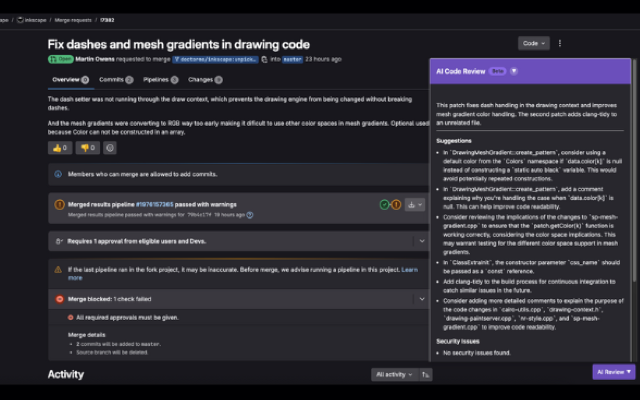
Explore more features, platforms, and documentation.
Connect Ollama Cloud in the portal and keep using ThinkReview in the pull request sidebar.