Code reviews inside Grok Bot
Ask Grok Bot to add the ThinkReview MCP. If GitHub is already connected, the Bot reviews the pull request in the same chat.

Ask the Bot to add ThinkReview. If GitHub is already connected, the review happens in the chat.
Grok Bot already opens pull requests. The Grok Bot 101 guide walks through a Bot that drafts a prompt, starts a Cursor cloud agent, and reports back when the pull request lands. The step that still protects the merge is a review of that diff by something that did not write it.
ThinkReview is that reviewer. It reads the pull request on GitHub, GitLab, Azure DevOps, or Bitbucket and returns a structured review: a summary, severity-ranked findings, and security notes. Inside Grok Bot, ask the Bot to add ThinkReview, then ask it to review the URL. The diff stays on the host.
Ask the Bot to add it
Grok Bot can install an MCP server that is not in the app catalog. The computer and apps docs say you can ask a Bot to add one by URL. ThinkReview's server is public HTTPS, which is the shape that path expects.
Send this:
Add the ThinkReview MCP at https://mcp.thinkreview.dev/v1.
The Bot adds the server and shows a Connect card when it needs you to sign in. Finish that in the browser, on your ThinkReview account. Connectors are account-wide, so the review tool is ready for the other Bots on the account from the next message. On a team, an admin's connector policy can block a custom server. If the add fails there, the admin has to allow mcp.thinkreview.dev.
If you would rather type it yourself, open Connect apps, choose Add a custom connector, set the type to Remote HTTPS, and paste https://mcp.thinkreview.dev/v1.
GitHub does the finding
If GitHub is already connected in Grok Bot, the Bot can see repositories, issues, and pull requests through the GitHub connector. That connection is how it finds the change.
Ask:
Review https://github.com/org/repo/pull/123 with ThinkReview.
The Bot calls review_url_code with that URL. ThinkReview fetches the changed files through the git credentials in your portal integrations, the same ones the browser extension uses, and returns the review into the chat. A private repository needs that integration to be able to read it. If the extension already reviews that host, the credential is already there.
A routine turns the ask into standing work. Grok Bot can watch a GitHub pull request and run when one opens. Point that routine at ThinkReview and the review shows up without you pasting the link each time.
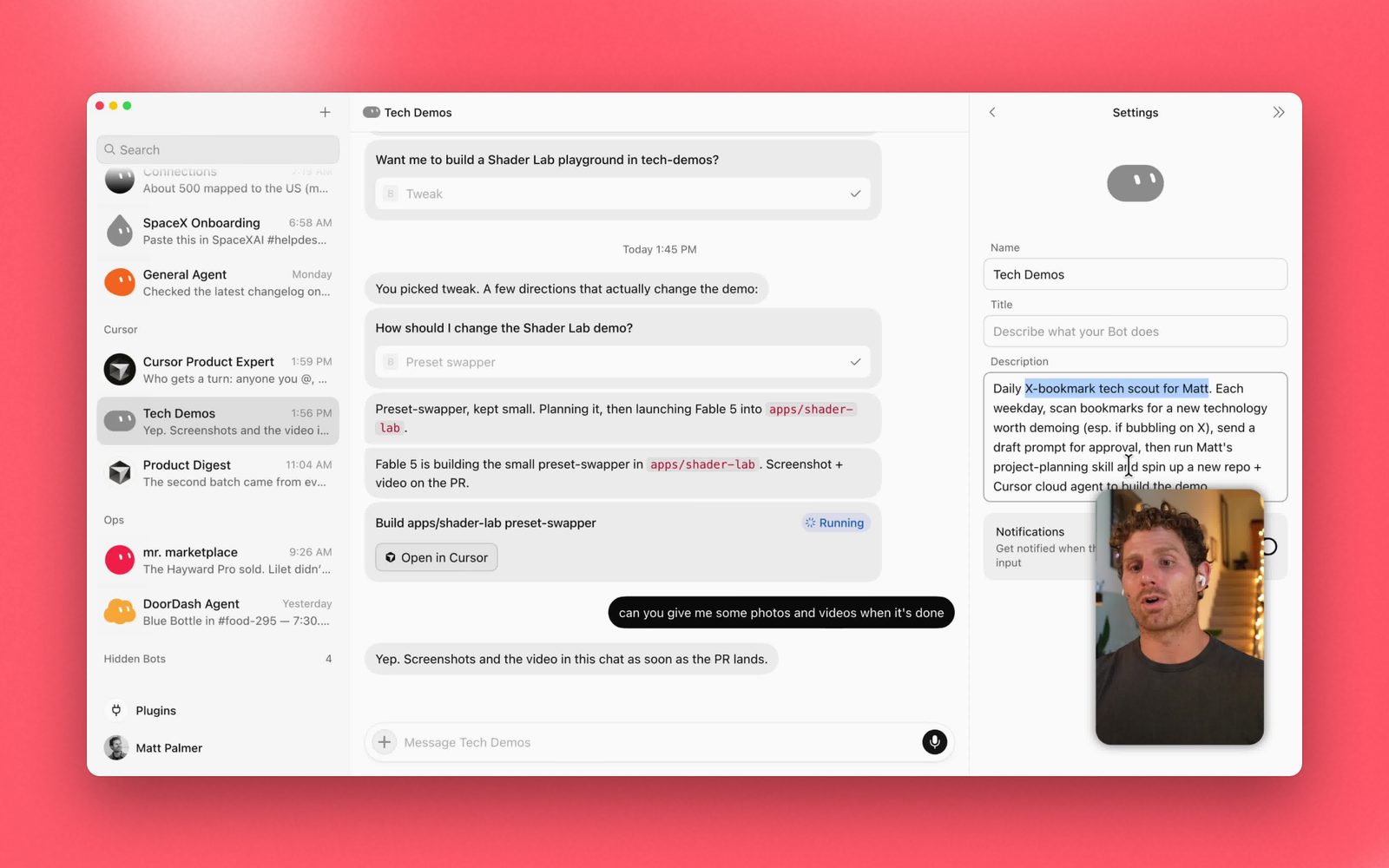
Source: Grok Bot 101, SpaceXAI. The Bot starts the build, then comes back when the pull request lands.
What comes back
The tool returns the same review as the extension: a summary, findings with severity, security notes, and a reason in plain language. Your custom rules apply. The model is the one you picked in model selection, so the reviewer can be a different family from the model that wrote the branch.
It spends the same review credits as a review in the browser. When the changed-file list has not moved, a second ask reuses the cached review.
The Bot can then patch what you agree with, push to the same pull request, and review again. That loop stays in the chat. The page is still there when you want it: the extension reviews the same URL on GitHub, GitLab, Azure DevOps, and Bitbucket.
The same server in Hermes
Hermes Agent is the other shape from Grok Bot vs Hermes: you run it, and you can swap the model. It speaks MCP. Ask Hermes to add ThinkReview, or add the server yourself:
hermes mcp add --url https://mcp.thinkreview.dev/v1 --auth oauth thinkreview
Sign in when the browser opens, then hand Hermes a pull request URL. The review is the same tool. In Hermes, ThinkReview reads the diff with the git credentials in your portal. Details are in the Hermes MCP guide.
Cursor, Claude Code, and Codex use this server the same way. That setup is in ThinkReview in Cursor, Claude Code, and Codex.
Review before the merge
The Bot will keep opening pull requests. The habit that matters is a review of the URL before anyone merges it, from a reviewer that did not write the change.
Ask Grok Bot to add ThinkReview. If GitHub is already connected, ask it to review the next pull request in the chat. Setup for the server itself is on the MCP page and in the MCP integration guide.
Grok Bot's add-by-URL behavior follows Use the computer and apps. The GitHub connector is listed in Grok connectors. The pull-request workflow in the screenshot is from Grok Bot 101.
Newsletter
Want the next one?
Leave your email and I’ll send the post when it’s published. Models, agents, and the review work in between. No drip after that.
One email when we publish. Unsubscribe in a click.