ThinkReview Expands to Azure DevOps: AI Code Reviews Now Available for Microsoft's Platform
ThinkReview Expands to Azure DevOps: AI Code Reviews Now Available for Microsoft's Platform
We're thrilled to announce that ThinkReview now supports Azure DevOps! Starting November 2025, developers using Microsoft's Azure DevOps platform can enjoy the same powerful AI code review experience that has made ThinkReview the go-to choice for GitLab teams worldwide.
What's New: Azure DevOps Integration
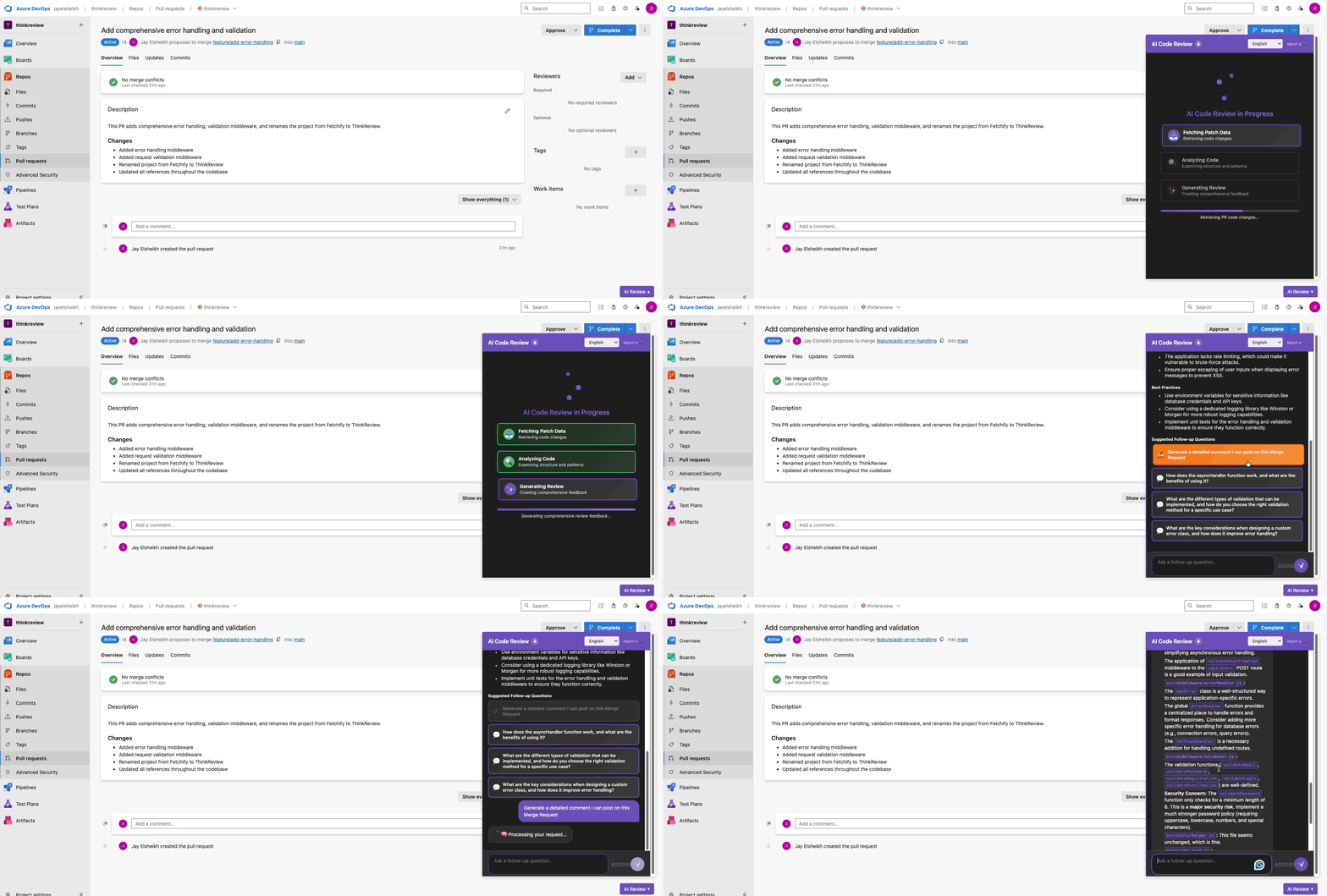
ThinkReview now seamlessly integrates with Azure DevOps repositories and pull requests:
- ✅ Azure DevOps Pull Requests: Complete support for Azure DevOps PR workflows
- ✅ Personal Access Token Authentication: Secure authentication using Azure DevOps PATs
- ✅ Real Code Diffs: Fetches actual code changes using Git-based API endpoints
- ✅ Same Great Experience: Identical review panel and AI capabilities as GitLab
- ✅ Multi-Platform Support: One extension for both GitLab and Azure DevOps
Supported Azure DevOps URLs
ThinkReview automatically detects and works with:
https://dev.azure.com/{organization}/{project}/_git/{repository}/pullrequest/{id}https://{organization}.visualstudio.com/{project}/_git/{repository}/pullrequest/{id}
Key Features
🤖 Instant AI Reviews
- One-click comprehensive code analysis
- Security vulnerability scanning
- Performance issue identification
- Code quality assessment
🎯 Smart Follow-Up Questions
Contextual AI-suggested questions help you dive deeper into code changes.
✍️ Generate PR Comments
Transform AI insights into team communication with formatted comments ready to paste into pull request discussions.
💡 Conversational AI Interface
Chat with the AI about specific code sections and ask follow-up questions naturally.
How to Get Started
Install ThinkReview: Visit the Chrome Web Store and click "Add to Chrome"
Configure Azure DevOps Authentication:
- Go to Azure DevOps → User Settings → Personal Access Tokens
- Create a new token with "Code (read)" permissions
- Click the ThinkReview extension icon → "Azure DevOps Settings"
- Paste your Personal Access Token and save
Start Reviewing: Navigate to any Azure DevOps Pull Request and click "ThinkReview"
Pricing
Azure DevOps support is available in ThinkReview's free tier with full features:
- Unlimited AI reviews for Azure DevOps Pull Requests
- Smart Follow-Up Questions
- Generate PR Comments
- Conversational AI interface
Pro Tier: $6.99/month for unlimited reviews and conversations with priority processing and premium support.
Conclusion
Azure DevOps teams can now enjoy the same AI-powered code review capabilities that have transformed GitLab workflows worldwide. ThinkReview brings faster reviews, better security, and higher code quality to Microsoft's platform.
Start your AI-powered Azure DevOps journey today—your code quality will thank you.
Frequently Asked Questions
How does ThinkReview work with Azure DevOps?
ThinkReview integrates directly with Azure DevOps Pull Requests through the Chrome extension. It uses Azure DevOps Personal Access Tokens for secure authentication and fetches actual code diffs for AI analysis.
Is my Azure DevOps code secure with ThinkReview?
Yes. ThinkReview uses enterprise-grade security with HTTPS-only communication, secure Personal Access Token authentication, and no permanent storage of your code.
Can I use ThinkReview for both GitLab and Azure DevOps?
Absolutely! The same extension works seamlessly with both platforms. You can review GitLab Merge Requests and Azure DevOps Pull Requests using the same interface and features.
Related Articles: