MCP vs API: what is the difference?
An API is how a program calls a service. MCP is how an AI assistant discovers tools. The difference, and where a code review MCP fits.

An API is how a program calls a service. MCP is how an assistant finds a tool and calls it.
“MCP” and “API” get used as if they were two names for the same plug. They sit in a stack. An API is the contract a service publishes so other software can call it. The Model Context Protocol is the contract an AI application uses to discover those capabilities and invoke them from a chat.
A pull request review needs both. The git host’s API fetches the diff. The assistant needs a tool it can see. ThinkReview’s code review MCP is that tool, in the middle of the editing session.
An API is a contract your code signs
An API, an application programming interface, is a published way for one program to ask another to do something. On the web that is usually HTTP: a method, a path, headers, a body, and a documented JSON response. GraphQL and gRPC are the same idea with a different envelope. The caller is code a developer wrote: a CI job, a backend, a bot.
You learn an API from its docs, then you own the client. A script that wants a GitHub pull request diff calls GET /repos/{owner}/{repo}/pulls/{pull_number}/files, sends a token, and parses the file list. The script decides when to call. Auth, pagination, and error codes are part of that contract.
That shape fits a caller that must behave the same way every time. A webhook. A nightly job. Another product embedding the service. The next step is already written down.
MCP is a contract an assistant can discover
MCP is an open protocol for connecting AI applications to tools and data. Anthropic published it in November 2024. Claude, ChatGPT, Cursor, and Visual Studio Code speak it, so one server can show up in each of them. The architecture is a host, a client, and a server.
The host is the app the person is talking to. It opens one client connection per server. The server advertises what it can do.
- Tools are functions the model can call, each with a name, a description, and a JSON schema for the arguments.
- Resources are data the host can read, such as a file or a record.
- Prompts are reusable prompt templates the server offers to the host.
The messages are JSON-RPC. A local server usually runs over stdio, started by the host on your machine. A remote server uses Streamable HTTP, often with OAuth, so a long-lived token stays out of the config file. On connect, the client asks the server what it offers. The model reads those schemas and calls a tool when the conversation needs it.
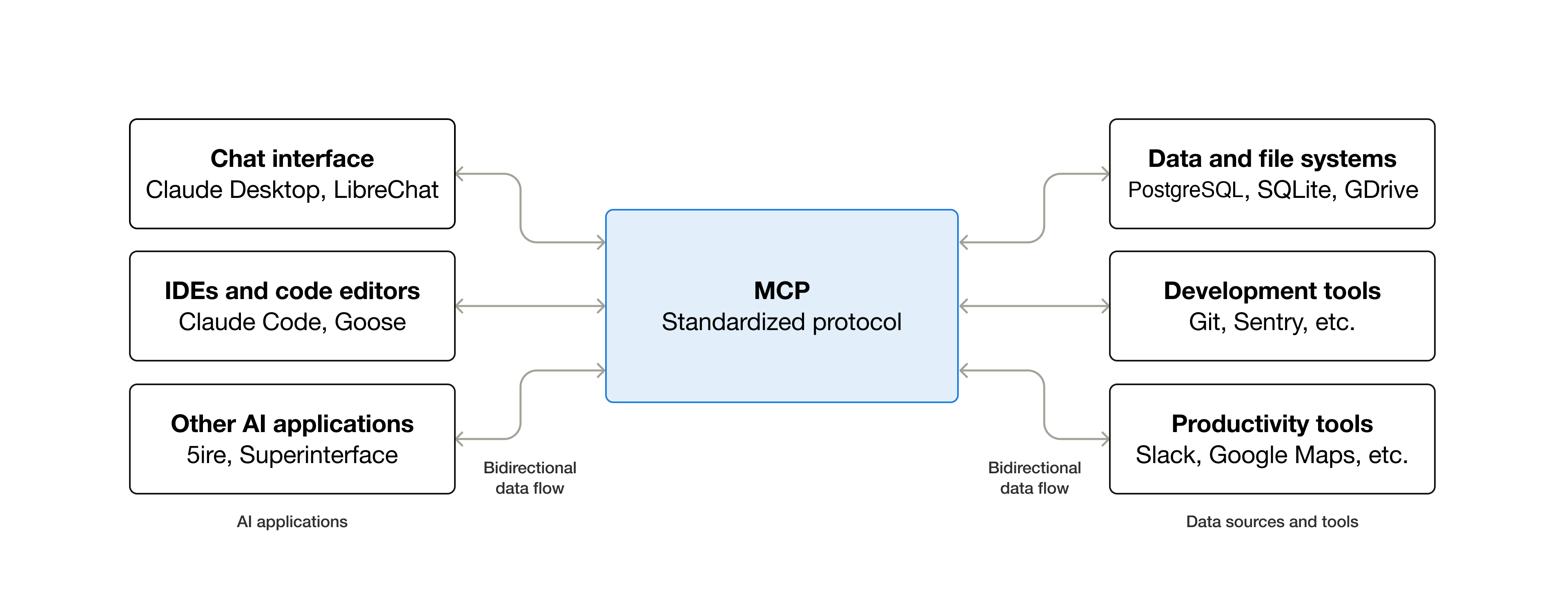
Source: What is the Model Context Protocol?, Model Context Protocol documentation.
Chat apps and IDEs sit on one side. Files, git, and issue trackers sit on the other. MCP is the shared middle, so each assistant keeps its own UI and still speaks one protocol to the tools.
What is actually different
| API | MCP | |
|---|---|---|
| Who calls | Code you wrote and deployed | The assistant, when the task needs the tool |
| How the caller learns it | Docs, then a client you maintain | The host lists tools and reads their schemas |
| What you publish | Endpoints, or a client for someone else’s endpoints | A server that exposes tools, resources, and prompts |
| How it travels | HTTP, gRPC, GraphQL, or a library | JSON-RPC over stdio or Streamable HTTP |
| Auth the caller handles | Whatever that API defines: a key, a PAT, or OAuth | OAuth on a remote server, or the rights of the local process |
A remote MCP server is usually a client of one or more APIs. The server speaks those APIs: paths, pagination, and credentials. MCP is the layer where a model chooses a tool. The API is the layer that fetches the data or changes the system.
A code review MCP in the middle
ThinkReview runs both layers. The MCP server is the one you meet in the editor.
The review still starts with APIs. ThinkReview uses the personal access token stored under Settings → Integrations in the portal and calls GitHub, GitLab, Azure DevOps, or Bitbucket for the changed files. Private repos and self-hosted hosts are that credential’s job. The token stays in the portal. The assistant receives the review.
The hosted server is https://mcp.thinkreview.dev/v1. It exposes one tool, review_url_code, which takes a pull request or merge request URL. Add that URL in Cursor, Claude Code, Claude Desktop, or Copilot, then authenticate in the browser. Ask for a review of the link. ThinkReview fetches the diff through the git API and returns the write-up in the chat: summary, severity, security notes, best practices, and follow-up questions.
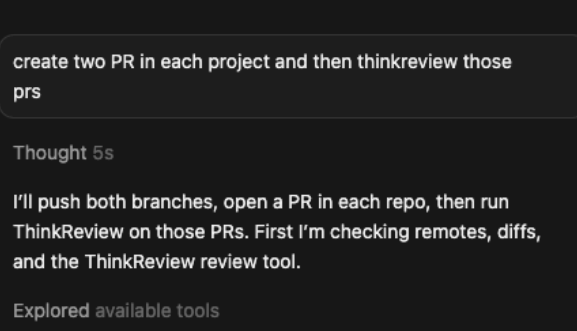
In Cursor, the assistant looks up the ThinkReview tool and calls it with the pull request URLs. The git host API stays on ThinkReview’s side.
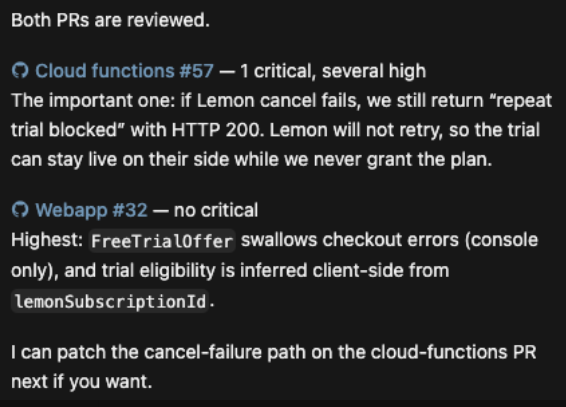
The tool result is a review the assistant can act on: severity, the broken path, and which pull request it belongs to.
Reviews use the same credits as the browser extension. Custom rules from the portal apply. An unchanged file list comes back from cache. MCP returns the main review. Custom review agents configured in the portal run from the extension. A walkthrough of findings the tests had missed is in how ThinkReview integrates into Cursor and Claude.
A Cursor config is the URL:
{
  "mcpServers": {
    "thinkreview": {
      "url": "https://mcp.thinkreview.dev/v1"
    }
  }
}
Enable the server, choose Authenticate, and finish consent on the ThinkReview portal. Claude Code is claude mcp add --transport http thinkreview https://mcp.thinkreview.dev/v1. Desktop and Copilot configs are in the MCP integration guide.
When the API is still the right call
Use an API when the caller is a program and the step is fixed.
- A pipeline that comments on every merge request, with no chat in the loop.
- Another product that embeds a service behind its own UI.
- A webhook that has to finish with nobody at the keyboard.
Use MCP when a person is already talking to an assistant that speaks the protocol, and the model should pick the tool. One server then reaches Cursor, Claude, and Copilot. You maintain the tool schema once.
Both layers stay in play for a pull request review. The git host API fetches the diff. ThinkReview’s MCP server is what the assistant calls.
Review the pull request from the editor
Add the server, connect the git host under Integrations, and ask for a review of the URL. Setup starts at portal.thinkreview.dev/mcp. On the pull request page, the same review runs in the browser extension.
ThinkReview reviews pull requests from the browser extension or from MCP inside Cursor, Claude Code, and Copilot.
Newsletter
Want the next one?
Leave your email and I’ll send the post when it’s published. Models, agents, and the review work in between. No drip after that.
One email when we publish. Unsubscribe in a click.