Code suggestions now in the ThinkReview extension

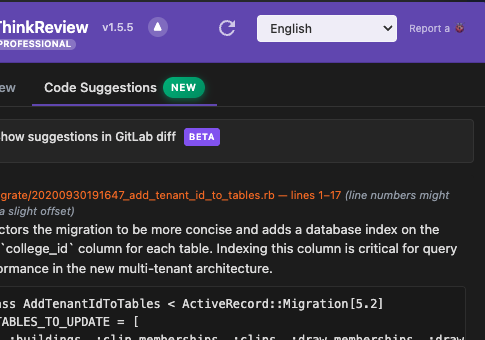
Code suggestions now in the ThinkReview extension
We're excited to announce code suggestions in the ThinkReview extension (v1.5.5). A new Code suggestions tab in the integrated review panel gives you AI-generated code improvements that are ready to copy and paste at the line number—so you stay in control, keep credit for the comment, and can tweak or post as-is.
What's new
ThinkReview now includes a dedicated Code suggestions tab in the integrated review panel. After you run a review, the tab shows AI-generated suggestions with copy-to-clipboard on each one and an Explain button to ask the AI for more context in the conversation. You paste the suggestion into the comment box at the relevant line, revise it if you want, and post it yourself. The comment stays under your name and reflects your judgment.
On GitLab, you can optionally enable "Show suggestions in GitLab diff" in the Code Suggestions tab (off by default) to see suggestions directly inline in your merge request diffs—or stick to the tab and paste at the line yourself.
Why it matters for reviewers
- You keep the credit — Comments and suggestions are posted by you, so the author sees the reviewer (you), not an automated account.
- Copy and paste at the line — Each suggestion has copy-to-clipboard; paste into the comment field at the line number and submit, with minimal editing.
- Explain when you need more — Use the Explain button on any suggestion to get more context from the AI in the conversation before you post.
- Full control — Edit, shorten, expand, or rephrase before posting. The suggestion is a starting point, not a final message.
- Fits your workflow — Use the tab when you want a nudge; ignore it when you prefer to write everything yourself.
How to use the Code suggestions tab
- Open a pull request — Go to your merge request on GitHub, GitLab, Azure DevOps, or Bitbucket.
- Open the review panel — Use the ThinkReview integrated review panel on the PR page and run ThinkReview to generate the review and suggestions.
- Open the Code suggestions tab — In the review panel, select the Code suggestions tab to see AI-generated code improvements tied to the diff.
- Copy, paste, and post — Use copy-to-clipboard on the suggestion you want, paste it into the comment field at the right line (or use inline suggestions on GitLab if you've enabled the toggle), make any edits, and post as usual.
Code suggestions are available for Professional, Lite, and Teams subscribers. If you're already using ThinkReview for reviews, the new tab is in your existing workflow—no extra setup.
What's next
We'll keep improving the quality and relevance of suggestions and how they're presented. If you have feedback or ideas, we'd love to hear them—open an issue on GitHub or reach out via thinkreview.dev.
Try the new Code suggestions tab in ThinkReview and keep full control of your review comments.