Finally, AI Copilot style on Azure DevOps.
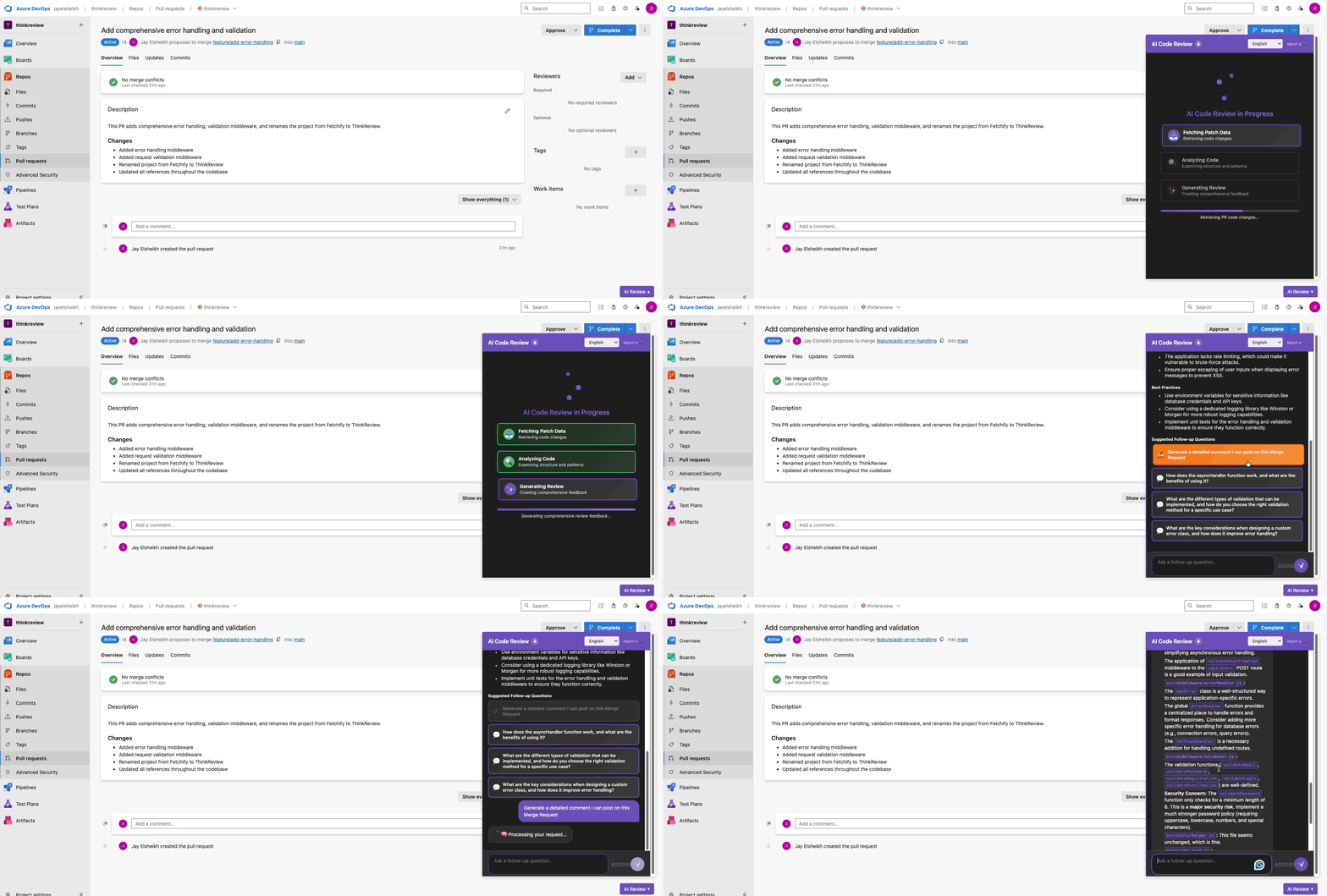
Finally, a Good AI Code Review Tool for Azure DevOps.
Stop copy-pasting code into ChatGPT. Get AI-powered reviews directly inside your Azure DevOps Pull Requests.
The "GitHub Envy" Problem
If you work in the Microsoft ecosystem, you know the struggle. GitHub gets all the cool new AI toys first. Copilot Pull Requests, flashy extensions, and integrations—they all launch on GitHub.
Meanwhile, Azure DevOps users are left with a clunky workflow:
- Open a Pull Request in Azure DevOps.
- See a complex block of code.
- Copy-paste it into an external AI tool (ChatGPT, Claude, etc.).
- Wait for an answer.
- Tab back to Azure DevOps to leave a comment.
We built ThinkReview to fix this. It is the first comprehensive AI code review extension that treats Azure DevOps as a first-class citizen, not an afterthought.
The Solution: Native Browser Integration
ThinkReview is a browser extension that injects AI capabilities directly into the Azure DevOps DOM.
There are no webhooks to configure, no CI pipelines to break, and no need to ask your DevOps lead for permission to install a server-side plugin. You just install the extension, and an "ThinkReview" button appears on every PR.
Key Features for Enterprise Teams
1. Zero Context Switching
The AI lives where you work. When you open a PR, ThinkReview analyzes the git diff instantly. You get a summary, bug report, and security audit in a sidebar overlay without ever leaving the dev.azure.com interface.
2. Smart Follow-Up Questions (New)
Static summaries are boring. ThinkReview makes the review interactive. After scanning a PR, it suggests questions like:
- "Are there any SQL injection risks in the new query?"
- "Does this adhere to the SOLID principles?" Click a question, and the AI interrogates the specific code changes to give you an answer.
3. Enterprise-Grade Security (Ollama Support)
We know Azure DevOps users often work in regulated industries (Finance, Healthcare, Gov). Sending code to the cloud is a no-go.
ThinkReview supports local inference via Ollama. You can run llama3 or deepseek-coder on your own machine. The extension talks to localhost, ensuring your proprietary code never leaves your network.
How It Works
- Install the Extension: Get it from the Chrome Web Store.
- Navigate to a PR: Open any Pull Request in Azure DevOps (Cloud or On-Prem).
- Click "ThinkReview": The extension detects the context and generates a review.
- Actionable Insights: Copy suggestions directly into Azure DevOps comments with one click.
Technical Specs
- Compatibility:
dev.azure.com/{org}/{project}{org}.visualstudio.com- Azure DevOps Server (On-Premise)
- Authentication: Uses your existing Azure session or a secure Personal Access Token (PAT) for API limits.
- Models Supported:
- Cloud: GPT-5.2, Gemini 3 Pro, Claude 3.5 Sonnet
- Local: Llama 3, DeepSeek, Mistral (via Ollama)
Why This Matters
Before ThinkReview
- Manual Effort: You spend 20 minutes reading boilerplate code.
- Security Risks: You might miss a hardcoded secret or a subtle race condition.
- Context Loss: Tabbing between VS Code, the browser, and ChatGPT breaks your flow.
After ThinkReview
- Instant Context: You get a "TL;DR" of the PR in 5 seconds.
- Automated Safety: The AI flags security vulnerabilities automatically.
- Flow State: You never leave the Azure DevOps tab.
Try It Today
ThinkReview is not just a "wrapper." It’s a productivity tool built by developers who live in Pull Requests.
Install ThinkReview for Chrome
- Free Tier: 5 Reviews/day (Perfect for testing)
- Pro Tier ($7/mo): 15 Reviews/day + Azure DevOps Support
- Privacy: Local AI support included for free.
Originally published on thinkreview.dev Last Updated: February 8, 2026