Chat with Your GitLab Merge Requests: The AI Copilot That Actually Understands Your Code
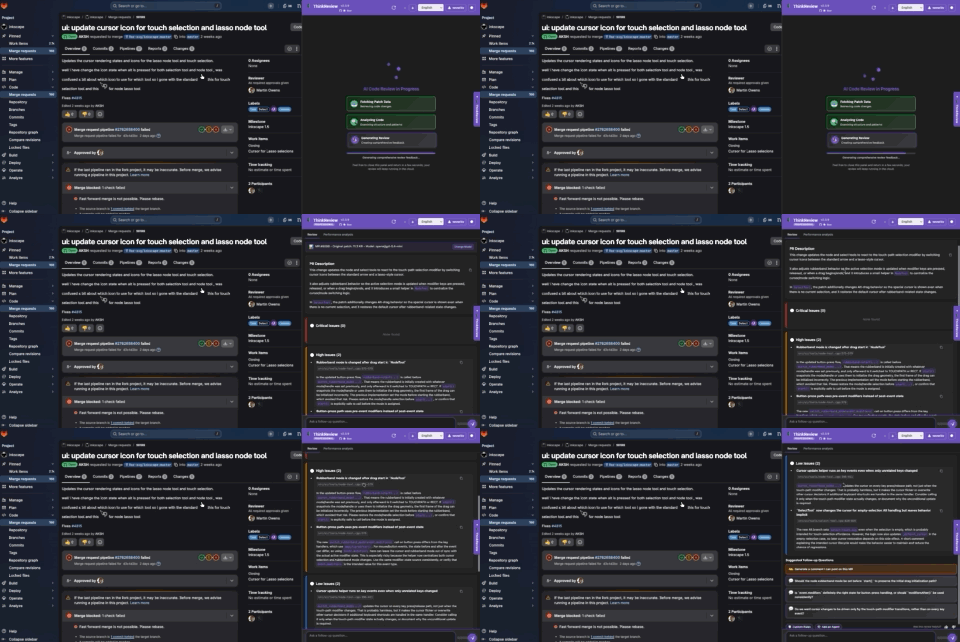
Chat with Your GitLab Merge Requests: The AI Copilot That Actually Understands Your Code
Why settle for static code reviews when you can have a conversation?
The Problem with Traditional Code Reviews
You open a GitLab merge request. You see hundreds of lines of code changes. You know you should review it thoroughly, but where do you even start?
- What changed? You scroll through diffs trying to piece together the story
- Why was this approach taken? The code doesn't explain itself
- Are there security issues? You're not sure what to look for
- What about edge cases? You might miss something critical
- How do I ask the right questions? You don't even know what you don't know
Sound familiar? You're not alone.
Traditional code reviews are one-directional: you read the code, maybe leave a comment, and that's it. But code review should be a conversation, not a monologue.
Introducing: The AI Copilot for GitLab Merge Requests
What if you could chat with your merge requests like you're pair programming with an expert developer?
That's exactly what ThinkReview does. It's not just another static analysis tool—it's a conversational AI copilot that lives right inside your GitLab merge request pages. Reviews use a severity layout (critical / high / low) or a scorecard, then suggested follow-up questions so you can keep digging.
Here's what makes it different:
💬 Real Conversations, Not Just Reports
Instead of dumping a wall of text, ThinkReview creates an interactive chat interface where you can:
- Ask follow-up questions in natural language
- Dig deeper into specific concerns
- Explore different aspects of the code changes
- Get instant, context-aware answers
🤔 Smart Follow-Up Questions That Know What to Ask
Here's where it gets really interesting. After the initial review, ThinkReview suggests 3-5 contextually relevant questions you can ask with a single click:
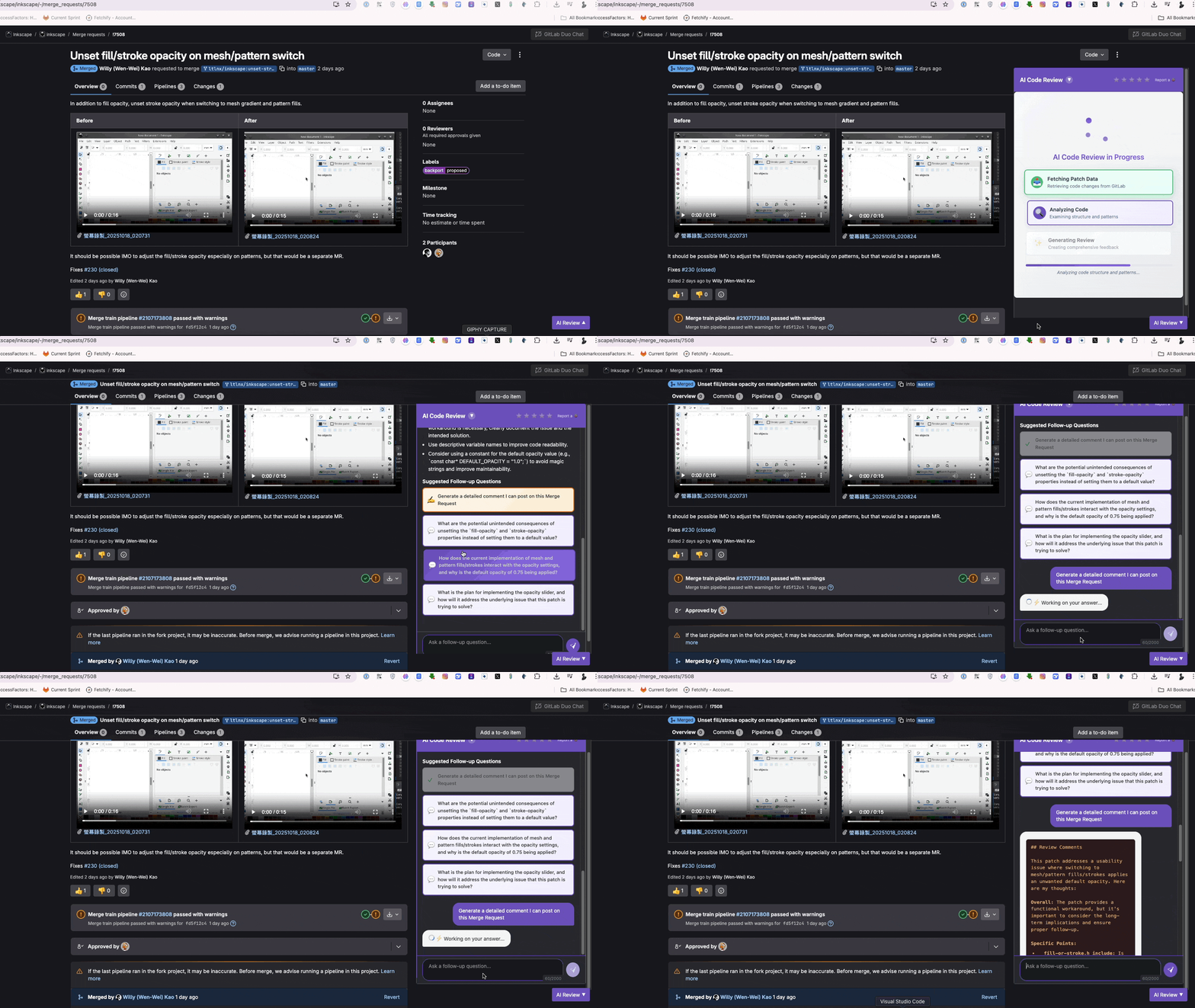
Click and explore—no typing required
Example questions you might see:
- "Are there any potential security concerns in these changes?"
- "What are the performance implications of this code?"
- "Can you generate a comment summarizing this MR for team review?"
- "Are there any edge cases that should be considered?"
- "How does this change affect the existing architecture?"
The magic? These aren't generic questions. They're generated based on the actual code changes in your merge request.
Why Conversational Code Review Changes Everything
1. Lower Cognitive Load
You don't need to think about what to ask. The AI suggests the most relevant questions based on what it found in the code.
Before ThinkReview: "Hmm, I should probably check something... but what? Let me think... security? Performance? I'll just type 'are there any issues?'"
With ThinkReview: Click → "Are there any potential security concerns?" → Get instant, detailed answer
2. Faster Learning for Junior Developers
New to the team? ThinkReview's suggested questions teach you what experienced developers look for:
- Junior dev sees: "What are the performance implications?"
- Junior dev thinks: "Oh, I should be thinking about performance!"
- Junior dev learns: Pattern recognition for future reviews
It's like having a senior developer mentoring you on every review.
3. More Thorough Reviews in Less Time
The clickable questions make it effortless to be thorough:
- ✅ Security? Click
- ✅ Performance? Click
- ✅ Edge cases? Click
- ✅ Architecture impact? Click
5 minutes of clicking = what used to take 30 minutes of deep thinking.
4. Visual Tracking of What You've Explored
Questions get marked with checkmarks when clicked, so you always know what you've already covered:
✅ Security concerns
✅ Performance implications
⬜ Edge cases ← "Oh, I haven't checked this yet"
No more wondering "Did I already ask about that?"
The Technology Behind the Magic
ThinkReview is powered by frontier models, some of the most advanced AI models available. But here's what makes it special:
Context-Aware Suggestions
The AI doesn't just analyze the code—it understands:
- The programming language and framework
- The type of changes (feature, bugfix, refactor)
- The files affected and their relationships
- The complexity level of the modifications
- Recent patterns in your questions
Then it generates questions that actually matter for this specific merge request.
Optimized for GitLab
Unlike general-purpose AI chatbots, ThinkReview is specifically trained on:
- GitLab merge request workflows
- Common code review patterns
- Security best practices
- Performance optimization techniques
- Architecture design principles
It speaks "developer" fluently.
How to Start Chatting with Your Merge Requests Today
Installation (2 minutes)
- Install ThinkReview from the Chrome Web Store
- Navigate to any GitLab merge request
- Click the ThinkReview panel
- Start chatting!
Works on:
- ✅ Chrome
- ✅ Microsoft Edge
- ✅ Brave
- ✅ All Chromium-based browsers
The Future of Code Review is Conversational
Static code reviews are dead. The future is interactive, conversational, and AI-powered.
Think about it:
- We chat with ChatGPT for general questions
- We chat with GitHub Copilot while coding
- Why wouldn't we chat with our code reviews?
ThinkReview brings the conversational AI revolution to where it matters most: the code review process.
Common Questions
"Won't this make developers lazy?"
Quite the opposite! It makes developers more thorough. The suggested questions expose blind spots and encourage deeper exploration. You're not replacing human judgment—you're augmenting it.
"Is my code secure?"
ThinkReview uses HTTPS-only communication and doesn't store your code. The AI analysis happens in real-time through secure frontier model APIs. Your code is handled with industry-standard security practices.
"Does it work with private GitLab instances?"
Yes! ThinkReview works with both gitlab.com and self-hosted GitLab instances.
"What if I prefer typing my own questions?"
No problem! Smart Follow-Up Questions are suggestions, not requirements. You can always type custom questions in the chat interface.
"How accurate is the AI?"
Powered by frontier models, the accuracy is excellent. However, AI should complement, not replace, human review. Always use your judgment for critical decisions.
Try It Now: Your First Conversational Review
Here's a challenge:
- Install ThinkReview (2 minutes)
- Open a GitLab merge request
- Click just 3 suggested questions
- Compare what you learned vs. a traditional review
We're confident you'll never go back to static code reviews.
The Bottom Line
Code review shouldn't feel like homework. It should feel like a conversation with a knowledgeable colleague who:
✅ Understands your code deeply
✅ Suggests what to look for
✅ Answers questions instantly
✅ Helps you learn and improve
✅ Makes the process actually enjoyable
That's what chatting with your merge requests feels like.
Stop reading code. Start conversing with it.
Get Started
🚀 Install ThinkReview: Chrome · Firefox · Edge
📚 Learn More: thinkreview.dev
💬 Questions? support@thinkreview.dev
Transform your code reviews from monologues to conversations. Your merge requests are waiting to chat.
Related Reading:
- ThinkReview vs GitLab Duo: Which AI Tool is Right for You?
- Self-hosted GitLab AI review comparison (2026)
- Release notes
Published on Medium and Dev.to by Thinkode AI
Keywords: chat with GitLab merge requests, AI copilot for code review, Smart Follow-Up Questions, conversational code review, interactive GitLab reviews, ThinkReview AI, frontier model-powered code review, GitLab AI assistant