
GitLab Integration
ThinkReview provides deep integration with GitLab, supporting both the cloud-hosted SaaS version and self-managed instances.
Supported Versions
Section titled “Supported Versions”ThinkReview is compatible with:
- GitLab.com (SaaS): The official cloud-hosted version of GitLab.
- GitLab Self-Managed: On-premises or private cloud installations with custom domains (e.g.,
gitlab.company.com).
GitLab.com (SaaS)
Section titled “GitLab.com (SaaS)”For users on gitlab.com, ThinkReview works out of the box. Simply install the browser extension, sign in, and you will see the ThinkReview button on the bottom right of your Merge Request pages. Click it to open the review panel.
GitLab Self-Managed
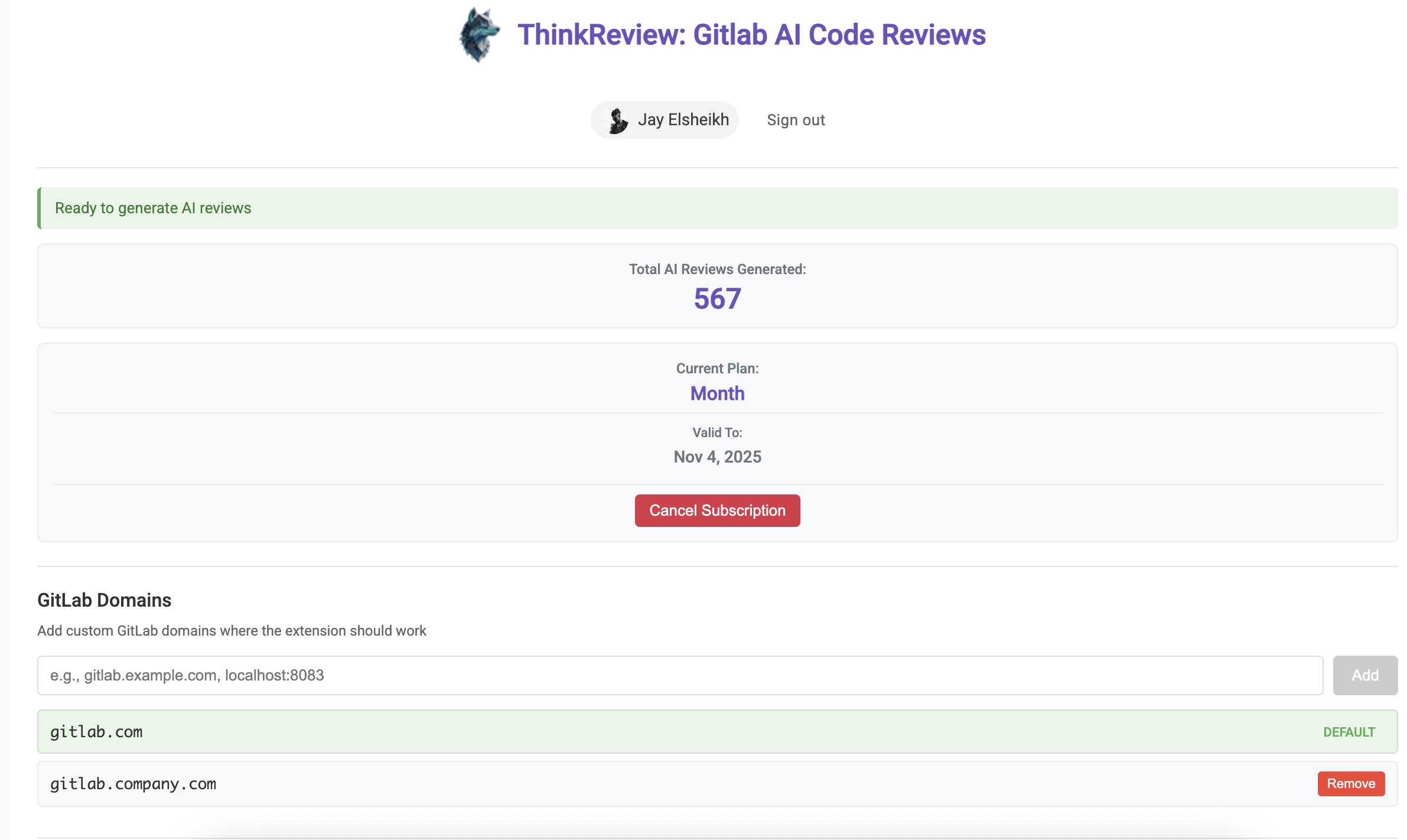
Section titled “GitLab Self-Managed”If your team uses a self-managed instance, you need to tell the extension which domain to look for.
Adding a Custom Domain:
Section titled “Adding a Custom Domain:”- Open the ThinkReview extension settings.
- Navigate to the Custom GitLab Domains section.
- Add your instance URL (e.g.,
https://gitlab.yourcompany.com). - The extension will request permission to access that specific domain.
- Once approved, the ThinkReview button will appear on your Merge Request pages just like on the SaaS version.
Full Context: Connect with GitLab (OAuth)
Section titled “Full Context: Connect with GitLab (OAuth)”On portal.thinkreview.dev/integrations, you can connect GitLab.com with Connect with GitLab (OAuth). That unlocks full-context reviews and features that call the GitLab API on your behalf — including posting review findings as merge request comments.
When ThinkReview asks for new permissions
Section titled “When ThinkReview asks for new permissions”If scopes change (for example, to allow posting MR comments), you need a new authorization. Existing tokens keep the old scopes until you reconnect.
Preferred: In the portal under Integrations → GitLab, use Reconnect on your saved GitLab OAuth credential, then approve the updated permissions in GitLab.
If Reconnect does not show a new consent screen, revoke the old authorization in GitLab first, then connect again:
- Open GitLab’s authorized applications page: https://gitlab.com/-/user_settings/applications
(GitLab → Preferences → Applications, or Authorized applications on that page). - Find ThinkReview in the list of authorized applications.
- Revoke access.
- Return to portal.thinkreview.dev/integrations → GitLab.
- Click Connect with GitLab (or Reconnect) and approve the new scopes.
You can revoke ThinkReview anytime from the same GitLab applications page without uninstalling the browser extension.
Key Features in GitLab
Section titled “Key Features in GitLab”- ThinkReview Button: A quick-access button on the bottom right of your Merge Request to trigger the analysis.
- Sidebar Integration: After clicking the button, a native-feeling sidebar appears on the right side of your Merge Request with detailed results.
- Diff Analysis: ThinkReview reads the Merge Request diffs directly to provide context-aware suggestions.
- Discussion Integration: Suggestions can be used as a basis for your code review comments. With Full Context connected, you can also post findings to the MR from the extension.
- Real-time Refresh: Trigger a fresh review manually if the code has changed but the system hasn’t updated yet.
Troubleshooting
Section titled “Troubleshooting”ThinkReview button not appearing?
If the ThinkReview button doesn’t appear on your Merge Request page, it could be a caching issue with Chrome/Edge:
- Fully quit your browser (not just closing the tab or window - completely exit the browser application)
- Restart the browser and navigate back to your Merge Request
- The ThinkReview button should now appear
Posting a comment fails with “write access” or missing permissions?
Your GitLab OAuth connection may still use older scopes. Revoke ThinkReview under GitLab authorized applications, then reconnect from the Integrations page (see When ThinkReview asks for new permissions above).
If the issue persists after restarting your browser, please submit a bug report and we’ll help you resolve it.
TL;DR: ThinkReview supports GitLab.com and GitLab Self-Managed. For self-managed instances, add your custom domain in the extension settings. For Full Context on gitlab.com, connect OAuth in the portal; if permissions change, revoke at gitlab.com/-/user_settings/applications and reconnect.