
|
ThinkReview
|
|
|
🏢 ENTERPRISE READY UPDATE
ThinkReview for On‑Prem & Custom-Domain Azure DevOps
Now ThinkReview supports your on‑premise and custom‑domain Azure DevOps.
|
|
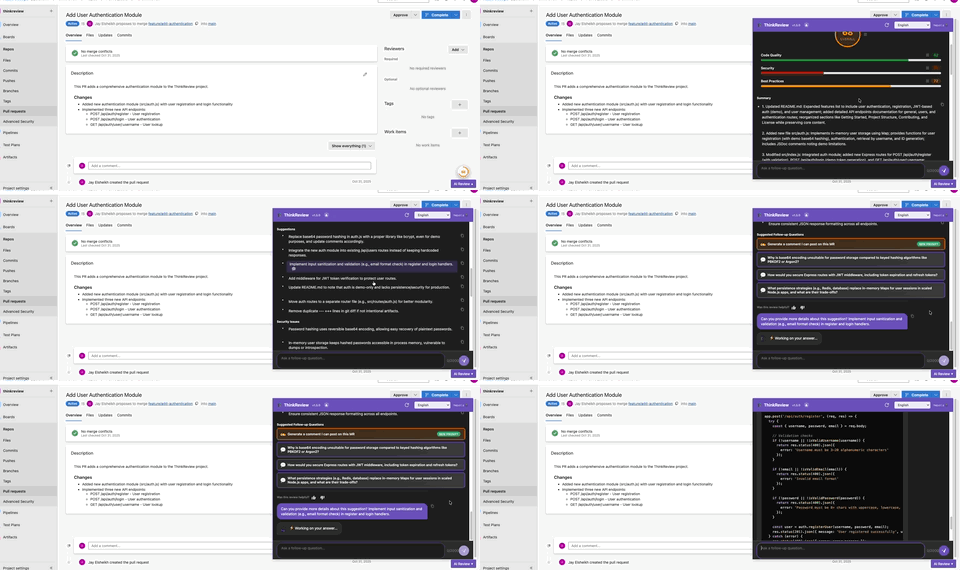
Seamless Code Review in Azure DevOps
See how ThinkReview brings AI-powered review directly into your Azure DevOps pull requests —
on both cloud and custom-domain/on‑prem instances.
|
Custom Domains for Azure DevOps
|
| ✔️ |
Support for self‑hosted & custom URLs: Use ThinkReview on on‑prem Azure DevOps instances like https://devops.yourcompany.com, not just dev.azure.com or *.visualstudio.com.
|
|
| ✔️ |
Same experience as cloud Azure DevOps: PR detection, AI review panel, and review summaries all work the same way on your custom-domain instance.
|
|
| ✔️ |
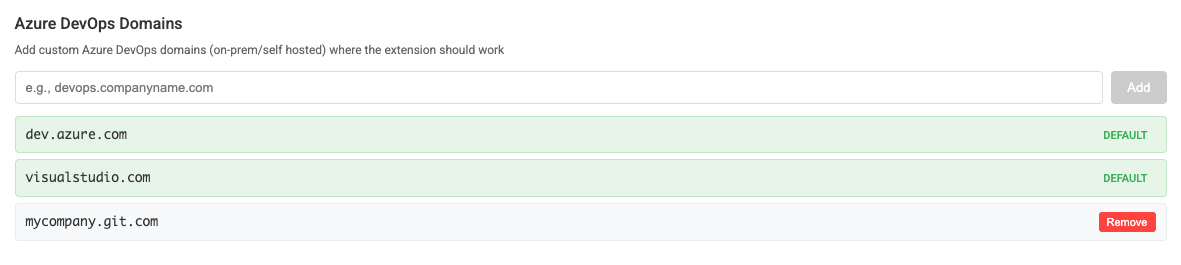
Easy configuration: Add your custom domain or hostname in the ThinkReview extension under Azure DevOps, grant permissions, and reload your PR pages. ThinkReview takes care of the rest.
|
|
|
How to Enable Custom-Domain Azure DevOps
|
|
1. Open the ThinkReview extension popup and go to the Azure DevOps section.
|
|
2. Add your on‑prem or custom Azure DevOps URL (full URL like https://devops.company.com or hostname only).
|
|
3. Grant the requested permissions and reload your Azure DevOps Pull Request pages.
|
|
4. ThinkReview will detect PR pages on your instance and show the AI review panel, just like on cloud Azure DevOps.
|
|
Why This Matters
|
|
Many enterprises run Azure DevOps Server or Azure DevOps Services on a private, custom URL. With this update, you can bring ThinkReview directly into those environments.
|
|
Your teams keep their existing infrastructure and URLs, while getting the benefits of AI-assisted, consistent code review across every pull request.
|
|
|
Use ThinkReview on your on‑prem Azure DevOps today.
Get Started with ThinkReview
Add your custom Azure DevOps domain in the extension settings, reload your PR pages, and start reviewing with AI in minutes.
|
|
|