
|
ThinkReview
|
|
|
✨ MAJOR PLATFORM UPDATE
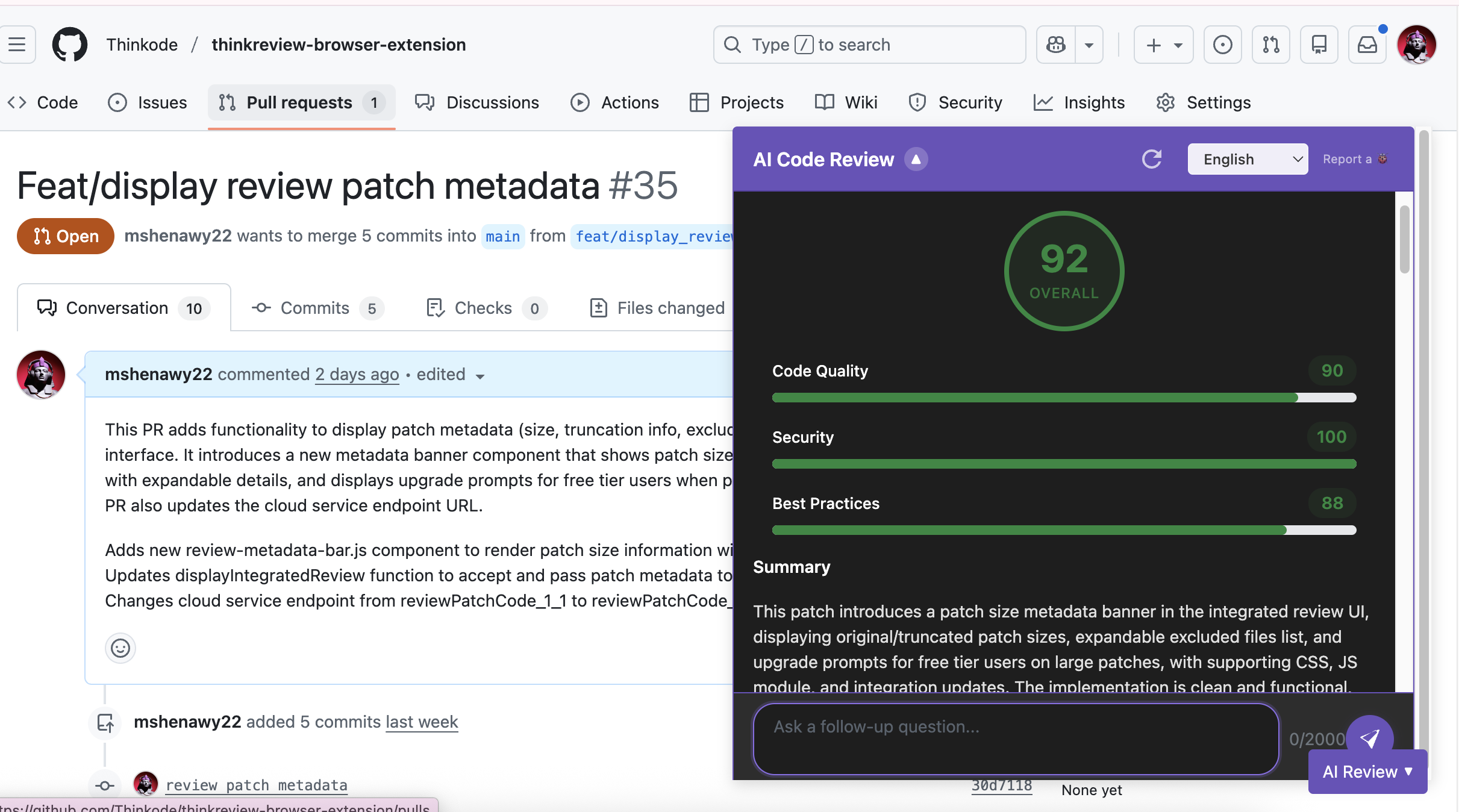
ThinkReview Now Supports GitHub Pull Requests
Get the same powerful AI-powered code reviews you love on GitLab and Azure DevOps, now available for GitHub Pull Requests. Seamless integration with zero setup required.
|
|
Seamless GitHub Integration
|
| ✔️ |
SPA Navigation Support: The ThinkReview button stays visible during navigation. Works perfectly with GitHub's single-page architecture—no page refreshes needed.
|
|
| ✔️ |
Real Code Analysis: Fetches actual code diffs from GitHub to provide accurate AI reviews that analyze your real code changes.
|
|
| ✔️ |
Zero Configuration: Works immediately after installation. No API keys, no tokens, no setup required.
|
|
|
Why Choose ThinkReview for GitHub
|
|
🚀 Multi-Platform Support: One extension works seamlessly with GitLab, GitHub, and Azure DevOps. Switch between platforms without changing tools.
|
|
🎯 Same Great Experience: Identical review quality and interface across all platforms. Consistent AI-powered insights wherever you work.
|
|
⚡ Always Available: ThinkReview button persists during SPA navigation. Instant reviews whenever you're on a Pull Request page.
|
|
🔒 Professional Reviews: AI analyzes your actual code changes using real diffs for meaningful, accurate feedback.
|
|
📦 Open Source: ThinkReview is open source and available on GitHub. Review the code, verify our privacy claims, and contribute to the project.
|
|
🔒 Your Privacy Matters
|
|
Does ThinkReview read or modify my code?
ThinkReview ONLY reads code diffs from PRs you explicitly open. It never writes, modifies, or changes any code. All access is read-only and user-initiated.
|
|
Is my code stored or retained?
No. ThinkReview has a zero code retention policy. Code diffs are sent to AI services for analysis and immediately discarded. Code only exists in memory for the few seconds needed to generate the review.
|
|
Read Our Privacy FAQs
|
|
|
Try ThinkReview on your GitHub Pull Requests.
Get Started with GitHub
The extension automatically detects GitHub PR pages. Just navigate to any pull request and click "ThinkReview"!
|
|
|
