AI code review on Bitbucket Data Center and self-hosted Bitbucket—custom domain, token setup, and a 1-minute guide.
ThinkReview
ENTERPRISE & SELF-HOSTED
Bitbucket Data Center Is Here—Custom Domain Support
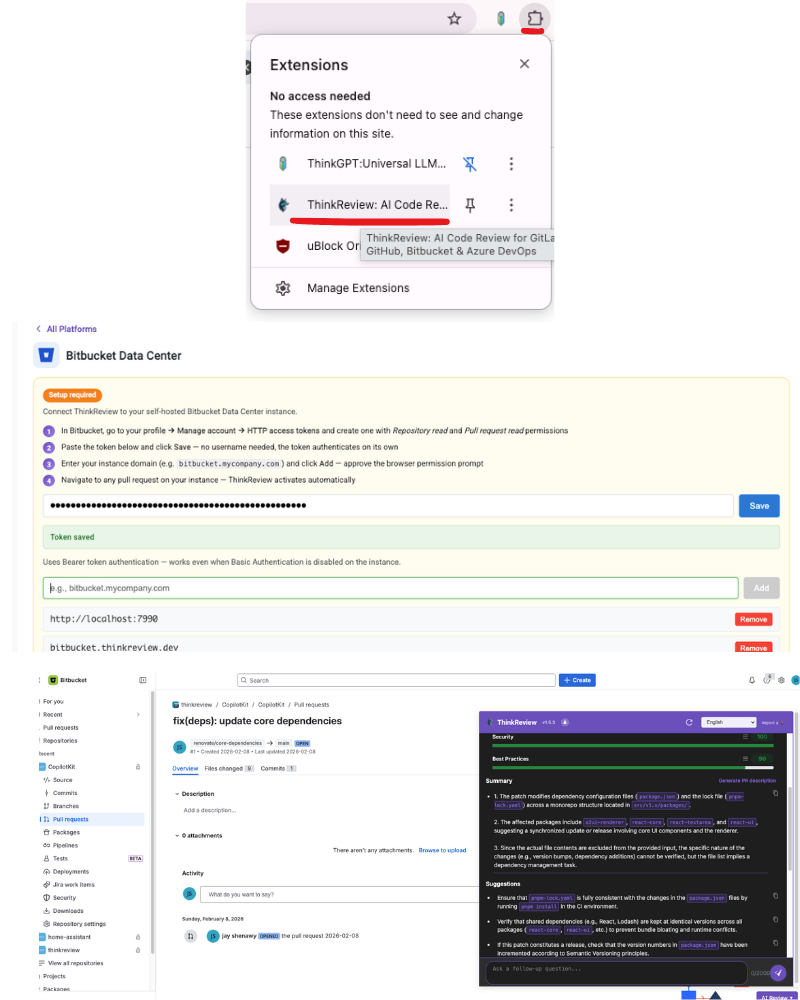
ThinkReview now works with Bitbucket Data Center and self-hosted Bitbucket when your browser can reach your instance. Point the extension at your server base URL, add an HTTP access token, and run the same AI reviews on pull requests you already use in the cloud.
1-minute setup guide (save this link)
Step-by-step: create your token in Bitbucket Data Center, open ThinkReview Settings, enter your instance URL and token, then open ThinkReview on a pull request.
Custom domain or internal hostname: Use the same base URL people use in the browser—include https, port, and context path if your admin configured one.
✔️
HTTP access token: Create a token in Bitbucket with permission to read repositories and pull requests, then paste it in ThinkReview settings so API calls stay on your instance.
🔗 Correct API routing: ThinkReview sends requests to the host you configure, so reviews load from your real PR pages.
☁️ Not Bitbucket Cloud?Bitbucket Cloud (bitbucket.org) still uses the separate Cloud integration guide.
Follow the 1-minute guide and connect your instance.